Showing posts with label 00. Show all posts
Showing posts with label 00. Show all posts
Monday, February 20, 2017
Hottest mtn unlimited free browsing tweak with 0 00
Hottest mtn unlimited free browsing tweak with 0 00
Hello, i know some of your guys most have been rocking this free mtn 0.00 browsing tweak! that oki, just wanna be sure it working before i post it here.
This is for those who have no idea about or have difficulties in setting it up / making it work.

Hello guys mtn free browsing is here again with psiphon handler Syphon Shield or Netify , With this mtn #0.00 tweak, you can browse and download Unlimitedly as you like and you can now leave the mtn bblited PLAN for now.
CONFIGURATION
Use your MTN default Setting or create New APN settings on your phone as follows:
» Open your phone settings > Go to more > Go to mobile network > Go to access point names > Select MTN, Then create new APN and configure as shown below:
» APN: web.gprs.mtnnigeria.net
» Proxy: 127.0.0.1
» Port: 8080
» Save And Activate it as your default settings
Use your MTN default Setting or create New APN settings on your phone as follows:
» Open your phone settings > Go to more > Go to mobile network > Go to access point names > Select MTN, Then create new APN and configure as shown below:
» APN: web.gprs.mtnnigeria.net
» Proxy: 127.0.0.1
» Port: 8080
» Save And Activate it as your default settings


Then Launch Psiphon Handler, in the handler menu:
» Proxy type: Real Host
» Proxy server: http://172.16.5.226/ or http://172.16.5.226@ or 172.16.5.226@
» Real Proxy Type:Default
» Real Proxy server: (leave it blank)
» Proxy type: Real Host
» Proxy server: http://172.16.5.226/ or http://172.16.5.226@ or 172.16.5.226@
» Real Proxy Type:Default
» Real Proxy server: (leave it blank)
» Select save and click on “tunnel whole device”.
Click on the option tab
» Region: select, USA or any other server
» Select more option, as it was indicated in the screenshot below
Click on the option tab
» Region: select, USA or any other server
» Select more option, as it was indicated in the screenshot below
» Check “Connect through an HTTP Pro” then select “Use the following settings:” then configure as.
» Host address: 10.199.212.2
» Port:8080
» Host address: 10.199.212.2
» Port:8080
Save and Click Connect
Enjoy while it last
#ictarenal
Available link for download

Sunday, February 19, 2017
New Working Setting For Glo N0 00 Unlimited Free Browsing Via Psiphon
New Working Setting For Glo N0 00 Unlimited Free Browsing Via Psiphon
Guys, it is time to enjoy unlimited free browsing with Glo network via Psiphon vpn. The setting is not something new and you might have used it few days back before it stopped working, but with the new settings below, you can get back on the track and start flexing unlimited with your Glo sim via Psiphon vpn.

Kudos to one of our patriotic fans: Amb Ige Hoyeniyi. He is the brain behind this new working setting.
If the Glo 3G network is strong in your area, simply insert your Glo sim card into your Android device and follow the instruction below carefully to get it rolling.
» Download the latest Psiphon vpn in town named Gurusnizkid Handler vpn - Download it here
» Use the Glo default APN for your phone setting i.e APN should be glosecure and both username and password should be secure
» Now, open the inbuilt Browser or Chrome, go to hsi.glo.com
Press green button, press continue PAYU and click on continue.
Reboot your smartphone
Launch Psiphon Handler, in the handler menu:
» Mark remove port
» Proxy type: Real host
» Proxy server: redirect.glo.com
» Real Proxy Type: HTTP
Real Proxy Port: 80
» Hit the Save button
» Immediately you click save, a pop up message will appear requesting to use Tunnel whole device, just tap on the option to Tunnel Whole Device and it will take you to the next phase
» Choose the Option Menu
» Under this Option menu, you will see Select Region, tap and select USA
» Go to your More Option settings and untick connect through HTTP Proxy
» Go back now to the main page of the Psiphon and tap the start button below, wait for few seconds for it to Connect. Then, fire up any browser and any other apps.
If your connection not stable, kindly connect your terminal emulator to make it stable. Download terminal emulator here.
Open the app, press any letter, then clean d letter and press ping 127.0.0.1, press enter. Make sure you connect your Psiphon before open the terminal emulator.
That is all.
Here is another working setting, if the first one doesnt work for you, try this;
APN Settings, set it as follows; » Apn: Gloflat» Proxy: 127.0.0.1
» Port: 8080
Launch Psiphon Handler, in the handler menu:
» Font query: http://german-proxy.de
» Remove Port: Tick or untick» Proxy type: RealHost» Proxy Server: http://german-proxy.de» Port: 80» Real Proxy Type: Default
» Hit the Save button
» Immediately you click save, a pop up message will appear requesting to use Tunnel whole device, just tap on the option to Tunnel Whole Device and it will take you to the next phase
» Choose the Option Menu
» Under this Option menu, you will see Select Region, tap and select USA
» Go to your More Option settings and untick connect through HTTP Proxy
» Go back now to the main page of the Psiphon and tap the start button below, wait for few seconds for it to Connect. Then, fire up any browser and any other apps.
Enjoy it while it last.
Available link for download
Tuesday, February 14, 2017
Download FotoSizer Standard Edition v 3 00 0 549
Download FotoSizer Standard Edition v 3 00 0 549
FotoSizer adalah aplikasi yang dapat digunakan untuk merubah ukuran gambar atau image resize tool yang dimana kita bisa merubah ukuran banyak gambar sekaligus dengan sangat mudah dan cepat juga sangat ringan untuk digunakan.
Aplikasi ringan yang bernama FotoSizer walaupun memiliki kapasitas yang sangat kecil, namun memiliki berbagai fitur yang menarik terutama untuk yang biasa share photo di internet seperti di facebook, twitter, instagram dan lain-lain.
Dengan meresize suatu gambar atau photo, maka sahabat haramain software akan lebih mudah dalam mengatur resolusi yang dinginkan sehingga jika ada photo atau gambar yang memiliki resolusi yang cukup besar kita dapat memperkecilnya dengan mudah menggunakan FotoSizer 3.00.0.549.
Screenshot :
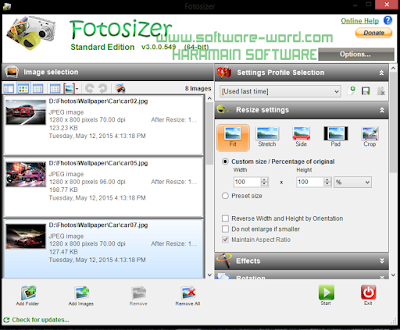
Batch resizing, watermarking and rotation:
- Resize, rotate and watermark hundreds of photos in one go, in minutes with the click of a button.
- Apply rounded corners to your photos to make them stand out.
- Add your name or copyright notice or your logo as watermarks on your photos. Stamp your authority over your images.
- Choose the font, font size, style and colour for your watermarks. Set custom transparency level, add shadows or rotate watermarks to your taste.
- View the real time preview of the resize settings, watermarks and other effects right on the photos you are changing so there are no surprises afterwards. Know precisely how the photos will look beforehand.
- Fotosizer supports 26 languages - English, French, German, Italian, Portuguese, Spanish, Dutch, Chinese. Use Fotosizer in your language.
Download FotoSizer Standard Edition v 3.00.0.549 ( Zippyshare 2,8 Mb )
Download FotoSizer Standard Edition v 3.00.0.549 ( Link Alternatif 2,8 Mb )
Password (if need) : | Status : Tested (Windows 8.1)
Available link for download
Subscribe to:
Posts (Atom)