Tuesday, March 14, 2017
How To Download Videos and Pictures from Instagram
How To Download Videos and Pictures from Instagram
If you are looking for how to download photos/videos from Instagram, you have come to the right place. Instagram has grown in leaps and bounds since its launch a few years ago. Instagram has been the springboard for the rise to fame of budding Nigeria comedians like Craze Clown, Akanm d boy and Twyse thanks to the video sharing feature. Unfortunately, Instagram still doesnt support downloading pictures or videos via the app despite the continuous roll out of new features. Below is a step by step tutorial for both Android and non-android users.
 |
| Source: Forbes |
STEPS FOR DOWNLOADING VIDEOS & PICTURES FROM INSTAGRAM
Android Users
- Download iGetter from the Google playstore (Check end of post for download link)
- Open Instagram App
- Tap the three vertical dots on the photo/video you want to download (See Image)
- Select "Copy share URL"

- Open iGetter App
- Paste the link in the space provided
- Click Download and wait for it to finish.
- Now you have successfully downloaded photo/video from Instagram
NON ANDROID USERS
- Open Instagram App
- Tap the three dots on the photo/video you want to download
- Select Copy share URL
RECOMMENDED: How To Download Videos From Twitter
- Go to this website here (Bookmark/Save the Page for next time)
- Paste Link in Box provided (See Image below)

- Click Download
If you face any difficulty or you have another method you use, leave a comment below!
Download Links
iGetter For Android
Instagram for Android
Available link for download

Saturday, March 11, 2017
How to download facebook videos easily
How to download facebook videos easily
Facebook is undoubtedly the largest Social Media platform in the world for social networking among heavyweight companies, medium industries, startups, one man business owners, politicians, music, movie and football stars, religious organizations and me and you.

In fact, any body that is using an internet enabled phone and he or she is not on Facebook is seen as an outdated fellow. The social media platform has gone from strength to strength after it was launched more than 11 years ago.
We have enjoyed many interesting features on Facebook including the data call, video call, photo sharing, Facebook groups, pages, Facebook Messenger chats and lots more.
Facebook is even competing with YouTube right now on the video sharing features. YouTube is the biggest video sharing social media platform at the moment but Facebook is diving into that aspect by providing new improved video options like increasing the length of shared videos and even allowing users to use video as their profile
Unfortunately, users on Facebook are not able to download videos they like in other to watch it later on their phones and that is why i came up with this article on how you can start downloading Facebook Videos that you came across on Facebook to your android devices, ios devices and laptops.
I was using Internet Download Manager (IDM) to download interesting Facebook Videos before now, but that is only achievable on PC but on this article, i will show you three (3) methods you can utilize to use to download any Facebook video to your phone and PC .
HOW TO DOWNLOAD FACEBOOK VIDEOS IN ANY DEVICE
This method of downloading videos on Facebook works on all devices and even java phones. It is a similar method used when trying to download YouTube videos on any device. I will show you examples and sites that you can make use of to achieve this simple task. The only thing yku need to do is to copy the link of that particular video you want to download and paste it on the sites i will show you below and the download link will be generated for you. Follow me along...
First Example
Using fbdown.net
==> Go to fbdown.net, look at the field and paste the link of the video you want to download as you can see from below screenshot.

==> Now, click on download, the video download link will be provided for you. One interesting aspect is that you can choose to download either normal quality or High definition quality as you can see below. This will help you in times of data management because the higher the video quality, the more data it will consume to download it.
Available link for download
Wednesday, March 8, 2017
Sunday, February 26, 2017
Opera Max A Free VPN App That Compress Videos Data More
Opera Max A Free VPN App That Compress Videos Data More
Purposeful for streaming online or the Netflixer’s, Opera, the browser company has introduced a new browser called Opera Max. Opera Max is a free VPN app that helps Android users manage and save data while streaming videos, music and viewing large photos through mobile and WiFi connection.

Available link for download
Saturday, February 11, 2017
ANDROID ठोबाइल से पैसे कठाठWatch Videos And Earn Money App videos देख
ANDROID ठोबाइल से पैसे कठाठWatch Videos And Earn Money App videos देख
Available link for download
Saturday, January 28, 2017
How to Download Gifs and Videos from Twitter Android Non Android Users
How to Download Gifs and Videos from Twitter Android Non Android Users
Twitter is one of the top social media platforms alongside Facebook, Instagram, Snapchat and Google+. The company founded in March 2006 now has about 310 million active users monthly. Statistics show that a days worth of tweet will fill a 10 million page book. Twitter has grown from a weird place where people just post random stuff to a powerful tool which brands are now leveraging upon.
Two of the greatest tools of Twitter is the ability to post Gifs and Videos. Everyday lots of funny Gifs/Videos are shared by users. Unfortunately, downloading them is a huge problem. Sometimes you see a great video on Twitter but cant send/show your friend who doesnt own a Twitter account. Not to worry, that ends now.
 |
| source: giphy |
How Can I Download GIFs and Videos from Twitter?
ANDROID USERS
- Download Gif For Twitter App (Check end of post for download link)
- Open Twitter App
- Open the Video/Gif you want to download
- Click the Share button

- Select Gif For Twitter

- Wait for it to download

Thats All!!
NON ANDROID USERS
- Open Twitter App
- Click the Video/Gif you want to download.
- Click the Share button (Check image above)
- Select "Copy to Clipboard"
- For Gifs, visit this site here (Bookmark the site so you dont need to remember the link everytime)
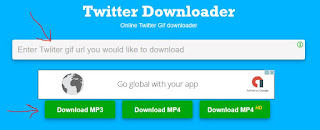
- For Videos, click here (Bookmark the site so you dont need to remember the link everytime)

- Paste the link in the space provided and click download.
- Wait for it to download
With these easy steps, you can download gifs and videos from Twitter. Remember to bookmark the two websites so you wont need to remember the link every time you want to download Gifs or videos. If you face any problem just drop a comment below. Im ready to help.
Download Gif for Twitter from Google Play Store
Available link for download
Wednesday, January 18, 2017
����Best Free Video Editing Free App For Android Edit Videos with PowerDir
����Best Free Video Editing Free App For Android Edit Videos with PowerDir
Available link for download