Tuesday, March 14, 2017
Glo Free Unlimited Browsing Android Users
Glo Free Unlimited Browsing Android Users
Just Few are still enjoying the Glo 0.0kb unlimited free browsing with our Psiphon and Sypon VPN, The only problem for now with the Glo tweak is that it disconnects frequently and reconnects back, one of the main reason most people are unable to use this tweak is that they have an active data subscription on their sim while others have airtime on their sim too. Most people havent been able to use this Glo tweak because their have a little airtime on their sim, which there would be unable to use it to call like 0.5kb - 0.7kb as you know already. Guides on how you can use all the airtime in it even the kobo left.
HOW TO USE ALL THE AIRTIME ON YOUR GLO SIM ? For you to be able to remove the penny kobo you have left on your sim, you would have to open your browser and open this link hsi.glo.com ? Then chose payu to continue using your airtime to browse. ? After that, use it 2 browse so u can wipe the money. ? Also whenever you subscribe it goes away from payu.
When youre done with the above steps you can now revisit your account balance and it should be 0.0kb.
Use ur Glo default fone configuration, Gloflat or Glosecure
Psiphon settings
GLO WITH PSIPHON VPN ? First of all you will have to Download Psiphon Pro Lite Here, configure as follows ? Proxy Type: Real Host ? Proxy server: redirect.glo.com ? untick connect through http proxy.


Thats all you have to do to enjoy this Glo tweak
Available link for download

Friday, February 24, 2017
See All New Airtel MTN Etisalat Revised Data Plan This Week Suitable For Heavy Users
See All New Airtel MTN Etisalat Revised Data Plan This Week Suitable For Heavy Users
This is all that has happened from the beginning of this week. Airtel decided to data bomb you with their new revised data plan as seen below … this is indeed data war.
 Get 5GB for N2.500 dial *437*1#
7GB for N3,500 dial *438#
3.5GB for N2000 dial *437#
1.5GB for N1000 dial *496#
750MB for N500 dial *418# Valid for 14Days.
And 12GB for N5000
Airtel Unlimited Night Plan
The unlimited night plan that Airtel unjustly increased the subscription price, is now normal but on a new plan entirely.
Airtel’s Unlimited Night Plan gives you unlimited download between the hours of 11pm and 6am. Unlike what their elder brother gives you from 12am – 4am.
To Get The Airtel Unlimited Night Data plan
1. N100- Unlimited browsing for 1 hour between 11pm and 6am
2. N200- Unlimited browsing for 2 hours between 11pm and 6am
How to subscribe to the Airtel Unlimited Night data plan?
1. Migrate to the Airtel SmartTRYBE by dialing *312#
2. Dial *312*3# to subscribe to the Airtel Unlimited Night Plan
MTN
Introduced 1GB for N500 but on deal zone package for pulse users. With just N500, 1GB will be smiling at you. Dial *406*2# (offer valid for 15Days).
Etisalat
While others were busy unveiling, revealing and releasing, Etisalat was busy strategizing… I haven’t try any of these plan but according to source, you can get …
6.5GB for N3,500(formerly 4.5GB). Dial *229*2*9#
16GB for N8000 (formerly 8GB). Dial *229*2*5#
22GB for N10,000 (formerly 10GB). Dial *229*2*1#
For N18,000 monthly, you now get 42GB (formerly 20GB). Dial *229*2*3#
Well, my hands are still crossed gazing closely what Etisalat is about to do… observing baba glo slow internet connection. #happy weekend
Available link for download
Monday, February 20, 2017
Glo Ng Data Rebranded PC Mobile Users etc
Glo Ng Data Rebranded PC Mobile Users etc
Got this off Glo Ng Instagram page, it really mind blowing but favorable to those who have glo strong network reception 3G in their environ.

Available link for download
Saturday, February 11, 2017
See meaning of WhatsApp End To End Encription Now Appearing For Users EverywehereÂ
See meaning of WhatsApp End To End Encription Now Appearing For Users EverywehereÂ
Encryption is one of the most important tools governments, companies, and individuals have to promote safety and security in the new digital age.
But its easier said than done. Privacy is very important when it comes to online security. WhatsApp seems to be one of the most secured chatting platforms. WhatsApp have been working so hard in improving its services. WhatsApp is set to roll out end-to-end encryption to all users.
With end-to-end encryption, WhatsApp asserts that only you and the people involved in your conversations can read your messages. No one, not even WhatsApp, can access them in route. Each message you send is secured with its own lock, with only you and your recipients having the key necessary to unlock. WhatsApp then claims to delete messages from its servers after theyve been delivered.
According to WhatsApp, “From now on when you and your contacts use the latest version of the app, every call you make, and every message, photo, video, file, and voice message you send, is end-to-end encrypted by default, including group chats.
The idea is simple: when you send a message, the only person who can read it is the person or group chat that you send that message to. No one can see inside that message. Not cybercriminals. Not hackers. Not oppressive regimes. Not even us. End-to-end encryption helps make communication via WhatsApp private – sort of like a face-to-face conversation.”
This feature comes as the result of a server-side change, so no new update is required. You dont even need a friend online to try things out. Messages sent to yourself are apparently also secured. So go ahead, talk to yourself, nobody will penalize you.
I don’t know if this update will be available for Blackberry 10, Windows phone 7 and Symbian users since WhatApp had announced that they’ll remove supports for these devices…Android OS is the way forward! What do you think about this update?

Available link for download
Saturday, January 28, 2017
How to Download Gifs and Videos from Twitter Android Non Android Users
How to Download Gifs and Videos from Twitter Android Non Android Users
Twitter is one of the top social media platforms alongside Facebook, Instagram, Snapchat and Google+. The company founded in March 2006 now has about 310 million active users monthly. Statistics show that a days worth of tweet will fill a 10 million page book. Twitter has grown from a weird place where people just post random stuff to a powerful tool which brands are now leveraging upon.
Two of the greatest tools of Twitter is the ability to post Gifs and Videos. Everyday lots of funny Gifs/Videos are shared by users. Unfortunately, downloading them is a huge problem. Sometimes you see a great video on Twitter but cant send/show your friend who doesnt own a Twitter account. Not to worry, that ends now.
 |
| source: giphy |
How Can I Download GIFs and Videos from Twitter?
ANDROID USERS
- Download Gif For Twitter App (Check end of post for download link)
- Open Twitter App
- Open the Video/Gif you want to download
- Click the Share button

- Select Gif For Twitter

- Wait for it to download

Thats All!!
NON ANDROID USERS
- Open Twitter App
- Click the Video/Gif you want to download.
- Click the Share button (Check image above)
- Select "Copy to Clipboard"
- For Gifs, visit this site here (Bookmark the site so you dont need to remember the link everytime)
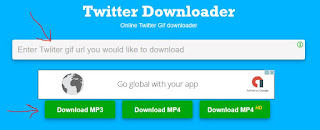
- For Videos, click here (Bookmark the site so you dont need to remember the link everytime)

- Paste the link in the space provided and click download.
- Wait for it to download
With these easy steps, you can download gifs and videos from Twitter. Remember to bookmark the two websites so you wont need to remember the link every time you want to download Gifs or videos. If you face any problem just drop a comment below. Im ready to help.
Download Gif for Twitter from Google Play Store
Available link for download
Saturday, January 21, 2017
MTN 4G LTE Users You Can Now Get Free MTN 5GB Data Reward
MTN 4G LTE Users You Can Now Get Free MTN 5GB Data Reward
Even if 75% of cities in Nigeria are yet to experience 4G network, MTN is finding the means to compulsory their 4G LTE for everyone. In a way to encourage people to swap their sim card for 4G LTE, MTN is giving out free 5GB of data when you upgrade your MTN sim to a 4G Sim card.

The offer is for MTN customers who have activated their 4G LTE network. The bonus data is to welcome you to the fast 4G network and it can be used for browsing, downloading, streaming etc.
To Get Your Free 5GB Data Reward
1. Get an MTN 4G LTE compatible Smartphone (supports band 20 (800MHz) and Band 7 (2600MHz)).
2. Insert your MTN sim card into the device.
3. Then send 4G to 131, youll get a reply thus:
Yello! You need to upgrade your SIM card and device to enjoy MTN 4G LTE. Please visit the nearest MTN store or partner retailer to upgrade now.Screenshot below:
For more information of MTN 4G LTE, including 4G coverage location; please visit www.mtnonline.com/4g or walk-in to any of our service centers nationwide.

4. If you got that message, it means your phone is to use good MTN 4G, just run to the nearest MTN store/outlet to do a 4G sim-swap.
5. Finally, dial *131*4# and the free 5GB data will be smile to you.
Remember that the Mtn 4G Sim card support only the specified 4G band, you can detect the 4G Bands and Frequencies of your Smartphone through this link: www.shelaf.com/2016/10/how-to-check...
Available link for download