Tuesday, March 14, 2017
Glo Unveils 4G LTE Network in Nigeria Check Here If Its Now Available in Your Area
Glo Unveils 4G LTE Network in Nigeria Check Here If Its Now Available in Your Area
This is a great surprise to the Glo lovers, Globacom just punches the clock with their own 4G LTE network like a dream in the night. This is coming just few months after MTN 4G went live.
Unfortunately, the Glo 4G network is only available in a few cities at this moment, but they are planning to extend it to other Cities soon. At this moment, it available in 9 major cities. The cities are;
 Dial *777# and select 4G LTE coverage, to check if the Glo 4G is live in your city.
Now you’ll appreciate the value of huge data for lesser price. You will still be able to enjoy Glos cheap and affordable data bundles as all their plans works with the 4G LTE network. See the list of the new Glo data plans that will be suitable for LTE users
1. 1.6GB for N500 valid for 10days
2. 3.2GB for N1,000 valid for 30days
3. 7.5GB for N2,000 valid for 30days
4. 10GB for N2,500 valid for 30days
5. 12GB for N3,000 valid for 30days
6. 18GB for N4,000 valid for 30days
7. 24GB for N5,000 valid for 30days
8. 48GB for N8,000 valid for 30days
9. 2GB + 2.5GB on Campus + N2,000 airtime + 500Mb data to gift for N2,000 valid for 30days
10. 5GB + 6.25GB on Campus + N5000 airtime + 1.25GB for N5,000 valid for 30days
Load the required amount of money on your Glo Sim. Dial *777#, then choose Data Services » Buy Data » Monthly Plans. Follow the on-screen instructions to activate the plan.
So far, these are the most competitive prices yet for mobile 4G LTE in Nigeria; The bitter truth is, its not how far, but how well. Its not about being the 1st, its about quality of service. Glo has rolled out its 4G LTE service, when their 3G is still invincible in most places. Anyway, let give their 4G trial.People have started enjoying MTN 4G network while Etisalat will follow suit very soon and come out of the shadow with 4G LTE. Airtel NG what are you waiting for?
If you have tried Glo 4G LTE service. Please share your experience in the comments section below.
Available link for download

Sunday, March 12, 2017
How To Switch to 4G LTE in Nigeria MTN GLO NTEL ETISALAT
How To Switch to 4G LTE in Nigeria MTN GLO NTEL ETISALAT
In less than a week, ETISALAT, MTN and GLO have officially launched their 4G LTE network across Nigeria. It seems Nigerias quest to achieve 30% (thirty percent) broadband penetration by 2018 might actually become a reality. Nigerians can now finally access super fast mobile internet service for the first time in a very long time. With 4G LTE now available to different parts of Nigeria, you can now enjoy the speed of broadband internet directly on your mobile device. Its time to throw your Swift/Spectranet/Smile modem to one corner. Lets get started.

NOTE
Before you think about switching to 4G LTE, you must have a 4G enabled device. The device must support band 700/800/1800/2100/2600MHz frequency. Just check the phone specification to make sure it supports the band. If you dont have a 4G LTE enabled device, you can check here for the cheapest and most affordable 4G LTE phones.
HOW TO SWITCH TO 4G LTE
MTN

GLO

NTEL

ETISALAT
Etisalat 4G LTE is the simplest to switch. If you have a 4G enabled device, just go to settings and change your network to 4G and start enjoying the speed. Meanwhile, Etisalat just increased the prices of their data plans. You may want to check them out before you decide to switch.
Still dont know which network to choose? Well, if you are looking for cheaper data plans, choose GLO 4G LTE. If you are a power user and need unlimited internet, just pick NTEL. But if you are looking for reliability and speed, just go with MTN and Etisalat 4G LTE respectively.
For those who dont have a 4G enabled device, I am compiling a list of the most affordable 4G LTE phones. Just subscribe to our newsletter so you dont miss out on the list. Meanwhile, you can check out Infinix Hot S or Infinix Zero 3. They are 4G LTE enabled and are relatively affordable too.
Which 4G LTE network are you switching too? Let me know, drop a comment.
Available link for download
Saturday, March 11, 2017
Etisalat 4G LTE Is Now Live Checkout 4G Speed Test Result
Etisalat 4G LTE Is Now Live Checkout 4G Speed Test Result
Im delighted to inform you that Etisalat 4G LTE is now live and out of ghost mode as it was before. When you scan the available network now, Etisalat 4G will show up on your 4G enabled smartphone and you can start using it right away without any form of SIM swap or whatever unlike MTN and Glo 4G that requires you to upgrade your SIM to a 4G enabled SIM in other to use the network.
You guys can testify to Etisalat fast internet speed even on 3G mode and they promise to bring more speed with their 4G. Below is Etisalat 4G LTE speed test results.

Etisalat NG 4G network is now up and running fine, but their 4G LTE coverage still limited to some parts of Lagos, Abuja, and other cities.
We will be updating you with the coverage progress as time goes on. Please, stay glued.
Available link for download
Sunday, February 19, 2017
Get Set To Welcome Etisalat 4G LTE Network
Get Set To Welcome Etisalat 4G LTE Network
While everyone’s attention has been on MTN, Etisalat Nigeria has been in a low voice building their own 4G LTE network. This 2016 is turning out to be the year of 4G LTE mobile in Nigeria. Now we have InterC, Smile, Spectranet, ntel, Swift and MTN. Etisalat is about to join the party, now set to roll out 4G LTE Service.
If you’re in Lagos and you have 4G enable device, a quick manual search will pull up the network as seen in the screenshot below. You won’t be able to access it yet, but at least it’s comforting to let you know that Etisalat 4G LTE is in a short distance away.

Just that we are wondering how that is possible, since Etisalat doesn’t own one of the traditional 4G spectrums. MTN Nigeria had to acquire Visafone to get their hands on the necessary license to deploy 4G service. We wonder who/what Etisalat was able to corner/acquire to come out with this.
Anyway, this is a wonderful buildup by Etisalat. As we are now perceiving the odor, get yourself prepared to welcome Etisalat 4G LTE Network.
Available link for download
Friday, February 17, 2017
Etisalat launches 4G LTE Plans and Increases Data Bundle
Etisalat launches 4G LTE Plans and Increases Data Bundle
Bismillahi
And other special about thing about it, is that, you don’t have to buy a new Sim card like MTN and
GLO . The Etisalat sims are automatically USIM(Universal Subscriber Identity Module) which doesn’t need sim upgrade before it will work on 4G. According to their twitter hashtag, #Etisalat4GNeedNoSimSwap.
Here are the price
*. 1GB for N1000
*. 1.5GB for N1200
*. 1GB + 500MB night plan for N1000
*. 2.5GB for N2000
*. 3.5GB for N2500
*. 2GB + 1.5GB night plan N2000
Well, is this a coincident or they planned it that way? After launching their long awaited 4G LTE Plan, they went ahead and increased their normal bundle plan.
Should we call this one Recession? Meanwhile, the 4G LTE is only available in Lagos for the main time but it is expected to arrived other cities within some few days or probably month.


Available link for download
Sunday, February 12, 2017
AT T to Launch LTE M IoT Trial
AT T to Launch LTE M IoT Trial
 |
| source: Qualcomm |
 |
| source: Qualcomm |
- Badger Meter – analyze how the LTE-M network, which is dedicated to supporting the IoT, may be used to enhance communications for smart water devices.
- CalAmp – explore how the LTE-M network can help companies more efficiently manage their connected vehicles and assets.
- Capstone Metering – demonstrate how LTE-M can improve Smart Cities sensor technologies. It will look to increase battery life and improve connectivity and sensor monitoring for underground smart water meters.
- PepsiCo – examine and test ways that sensors can improve the in-store experience with smart vending solutions for the thousands of PepsiCo products consumers love and enjoy.
- Samsung – evaluate an LTE-M-based solution to enhance performance for consumer solutions. This may include wearables or other consumer devices.
Available link for download
Saturday, February 11, 2017
What Need to Know About ntel 4G LTE Data Test Drive
What Need to Know About ntel 4G LTE Data Test Drive
Test Drivermation is still sketchy on this but the more it comes, the more we unfold. This is what you need to know bout ntel Data Test-Drive.
This offer is available to all new ntel customers, who will each be able to enjoy it for a 3-month duration at the start of their subscription.
ntel Data Test-Drive will enable customers to use our 4G/LTE-Advanced network to its full potential, and without having to monitor, or ration, usage. Customers will be offered the choice of paying a flat fee for one day, three days, a week or a month and have the entirety of their data usage, without limit, being inclusive to the price already paid, for their selected validity window.
Only after an ntel Data Test-Drive, will customers be invited to choose a tariff plan that suits their ongoing usage. To inform this choice, we will collate and share detailed daily, weekly and monthly reports of individual usage.
In addition, with ntel, customers will be able to purchase services within so-called “Bundles.” These will comprise sets of voice-over-LTE and Internet Access services that are grouped together and sold for a single flat fee, for fixed duration: from a single day; up to one month. And at prices that represent the very best value for money in Nigeria’s Telecom market today. Of course, for those customers who prefer a different approach, we provide a Pay-As-You-Go option that allows payments and charges to be made on an event-by-event (or call-by-call) basis.
Meanwhile, if you’ve collected your own SIM kindly let us know when and where.

Available link for download
Thursday, January 26, 2017
MTN 4G LTE See the Data Plan and Prices
MTN 4G LTE See the Data Plan and Prices
Over the past couple of months, MTN has been teasing us about the launch of their new 4G LTE service. The MTN 4G LTE service was originally launched in Ghana before arriving here in Nigeria. Apparently, only a few states can enjoy this new fast internet from MTN for now.

MTN also released the data plans and prices for the 4G network. Surprisingly, the plans are very different from the normal 3G plans. I wonder why 4G LTE data plans will be different from the 3G version. See them for yourself below:
MTN 4G LTE DATA PLANS
HOW TO SUBSCRIBE FOR MTN 4G
To subscribe, just dialNOTE: You need to have a 4G enabled smartphone or router that supports the 800/1800/2100/2600/ MHz frequency. Then go to any MTN Walk in centre close to you and request for a 4G enabled SIM, theyd switch your current line to the SIM.
If you are looking for alternative to MTN 4G LTE, you can get an NTEL 4G SIM Card. They have two plans which are unlimited. N1,000 for two days and N10,000 for 30 days. If you need a NTEL 4G SIM, just send me a message via the contact form at the end of this page.
Available link for download
Infinix Hot 3 4G LTE Full Specifications
Infinix Hot 3 4G LTE Full Specifications
This is the senior for infinix hot3 released earlier this time around this one came with 4GLTE and all other specification of the smartphone will wao you..

Now let see the full specification below:
General
Technology: GSM / HSPA / LTE
Announced: 2016, February
Status: Coming soon. Exp. release 2016, March
2G Network: GSM 850 / 900 / 1800 / 1900 - SIM 1 & SIM 2
3G Network: HSDPA 850 / 900 / 1900 / 2100
4G Network: LTE
SIM: Dual SIM
Body
Dimensions: 152.6 x 76.2 x 8 mm
Weight: 167 g
Display
Type: HD IPS capacitive touchscreen, 16M colors
Size: 5.5 inches (~68.4% screen-to-body ratio), 720 x 1280 pixels (~294 ppi pixel density)
Multi-touch Yes
- XUI
Protection GGF Full Lamination
Camera
Primary: 8MP 0V8865, autofocus, LED flash
Features: Geo-tagging, touch focus, face detection, HDR, panorama
Video: 1080p@30fps
Secondary: 2 MP
Features
OS Android OS, v5.1 (Lollipop)
Chipset Qualcomm MSM8929 Snapdragon 415
CPU Quad-core 1.4 GHz Cortex-A53 & quad-core 1.2 GHz Cortex-A53
GPU Adreno 405
Sensors Accelerometer, proximity
Messaging: SMS (threaded view), MMS, Email, Push Mail, IM
Browser: HTML5
Radio: FM radio
GPS: Yes, with A-GPS
Java: No
Colors: Light Green, Grey, Pink, White and Gold
- Active noise cancellation with dedicated mic
- MP4/H.264 player
- MP3/WAV/eAAC+/FLAC player
- Photo/video editor
- Document viewer
Sound
Alert Types: Vibration; MP3, WAV ringtones
Loudspeaker: Yes
3.5mm Jack: Yes
Memory
Card Slot microSD, up to 64 GB (dedicated slot)
Internal : 16 GB, 2GB RAM
Data
GPRS: Yes
EDGE: Yes
Speed: HSPA, LTE Cat4 150/50 Mbps
WLAN: Wi-Fi 802.11 b/g/n, hotspot
Bluetooth: v4.1, A2DP, LE
USB: microUSB v2.0, USB On-The-Go
Battery: Removable Li-Ion 3000 mAh battery
Stand-By 650 h
Talk Time 20 h
Music Play 33 h
Price: $119 (N35,700)
Available link for download
Monday, January 23, 2017
Mtn 4G LTE Data Bundle Plan – Prices and Subscription Code
Mtn 4G LTE Data Bundle Plan – Prices and Subscription Code
Bismillahi..
Mtn Nigeria has finally introduce their 4G LTE Data Plan which can only be usable on 4G LTE Phones ! Mtn didn’t work with the former Data Plans which are very cheap and affordable!
Below are the subscription code to the Mtn 4G LTE Data Bundle!
– 100MB for N500 (7days validity)
– 150MB for N499 (daily)
– 200MB for N1000 (30days validity)
– Unlimited data for N36,999 (30 days 24/7)
– 42GB for 12Months N66499
– 10GB for N6000 (30 days validity)
– 15GB for N10,000 (30 days validity)
OR
– Dial *444# and choose your plan. But your phone must be 4G LTE enabled. Stay Updated with us!
Post Comment
Leave a Comment
SHARES
Whatsapp us on 07035311650

Available link for download
Saturday, January 21, 2017
Tecno W5 Coming With Slim Body Finger Print ID and 4G LTE Support
Tecno W5 Coming With Slim Body Finger Print ID and 4G LTE Support
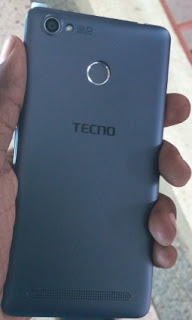
It seems Tecno really mean the business this time around, a few weeks back, they released Tecno Phantom 6 and 6 Plus. Now, Tecno has set to launch another device, a family of Tecno W Phone Series and the name of the incoming device is Tecno W5.

The Tecno W5 has not been officially announced yet. Based on the specification released, it is an upgrade version of the Tecno W4. It has 4G LTE, a bigger screen, a bigger battery, slim body with metallic frame, and a fingerprint scanner. Below are the specifications and features of Tecno W5.
Technology
- GSM: GSM 850 / 900 / 1800 / 1900
- 3G: HSDPA 900 /1900/ 2100
- 4G: LTE 3(1800) / 7(2600) / 20(800)
- SIM Type: Dual-SIM (micro SIM, dual standby)
- OS: Android 6.0 Marshamallow
- Dimensions:
- Weight:
- Display: 5.5 inches, 720 x 1280 pixels (300 PPI), IPS LCD touchscreen
- Sensors: Accelerometer, Proximity and Compass
- Processor Type: Quad-core 1.3 GHz Cortex-A53
- Processor Name: Mediatek
- Graphics Processor:
- RAM: 1 GB
- Internal Storage: 16 GB
- External Storage: microSD, up to 64 GB
- Rear: 13 MP, autofocus, LED flash
- Video recording: 1080p@30fps
- Front-facing: 5 MP
- Music Support: AAC, AMR, MP2, MP3, M4A, MKA,
- Loudspeaker: Yes
- Video Support: MP4/MPEG4/H.263/H.264 player
- FM Radio: Yes
- Bluetooth: v4.0
- WiFi: Wi-Fi 802.11 b/g/n, hotspot
- GPS: Yes
- USB: microUSB v2.0
- Battery: 3000 mAh
- Announcement: TBA
- Availability: TBA
- Launch Price: TBA
Yeah, it is a 4G LTE device, but unfortunately, it doesn’t support band 28, Glo 4G LTE.It has Band 3(1800) / 7(2600) / 20(800), which support MTN, Etisalat, ntel and Smile Nigeria 4G network only. Note that it is too early to be sure about anything on this device, just take everything with a pinch of salt. The real images and specifications will be communicated to you as soon as we get the naked truth.
Available link for download
MTN 4G LTE Users You Can Now Get Free MTN 5GB Data Reward
MTN 4G LTE Users You Can Now Get Free MTN 5GB Data Reward
Even if 75% of cities in Nigeria are yet to experience 4G network, MTN is finding the means to compulsory their 4G LTE for everyone. In a way to encourage people to swap their sim card for 4G LTE, MTN is giving out free 5GB of data when you upgrade your MTN sim to a 4G Sim card.

The offer is for MTN customers who have activated their 4G LTE network. The bonus data is to welcome you to the fast 4G network and it can be used for browsing, downloading, streaming etc.
To Get Your Free 5GB Data Reward
1. Get an MTN 4G LTE compatible Smartphone (supports band 20 (800MHz) and Band 7 (2600MHz)).
2. Insert your MTN sim card into the device.
3. Then send 4G to 131, youll get a reply thus:
Yello! You need to upgrade your SIM card and device to enjoy MTN 4G LTE. Please visit the nearest MTN store or partner retailer to upgrade now.Screenshot below:
For more information of MTN 4G LTE, including 4G coverage location; please visit www.mtnonline.com/4g or walk-in to any of our service centers nationwide.

4. If you got that message, it means your phone is to use good MTN 4G, just run to the nearest MTN store/outlet to do a 4G sim-swap.
5. Finally, dial *131*4# and the free 5GB data will be smile to you.
Remember that the Mtn 4G Sim card support only the specified 4G band, you can detect the 4G Bands and Frequencies of your Smartphone through this link: www.shelaf.com/2016/10/how-to-check...
Available link for download
Tuesday, January 17, 2017
Cara Mengatasi Fix 4G LTE Yang hilang di MIUI8 dengan Mudah dan Aman
Cara Mengatasi Fix 4G LTE Yang hilang di MIUI8 dengan Mudah dan Aman
Xiaomi dengan produk mereka yang masuk di indonesia kini terkena Kebijakan pemerintah yaitu TKDN dimana xiaomi harus menghilangkan 4G ltedi indonesia, entah apa alasanya saya juga tidak tahu. banyak sekali cara mengatasi hilang 4G LTE di MIUI7 atau MIUI8 Global Stable. kita akan bahas satu persatu bagaimana cara mengatasinya :)

Kita tahu bahwa sebenarnya mesin atau hardware dari xiaomi redmi note 3 pro dan device baru lainya sudah mendukung 4G, karena terkendala oleh kebijakan maka kita harus pintar dalam mencari celah dan cara untuk mengatasi masalah 4G LTE yang ngumpet di xiaomi ini.
Cara Mengatasi/Fix 4G LTE Yang hilang di MIUI8 Semua Xiaomi dengan Mudah dan Aman (NO ROOT, NO UBL, SIMPLE, 100% WORK)
- Pastikan wilayah tempat kamu tinggal sudah tercover jaringan 4G
- pastikan juga Kartu SIM kamu sudah mendukung 4G, biasanya ditandai dengan tulisan 64K
- Pastikan juga kamu memiliki kuota yang cukup
- Pilihan LTE ONLY juga bisa kamu sesuaikan dengan pilihan lain
Gunakan Aplikasi Pihak Ktiga
- Silahkan Kalian Instal Aplikasi Ini Terlebih dahulu
- Setelah Itu Instal dan Buka Aplikasi tersebut
- Kemudian di search atas silahkan Kalian Ketikan "Switch 4G"

- Jika sudah ketemu seperti yang saya kasih tanda diatas, silahkan klik gratis :)
- Setelah itu tunggu downloadan selesai, kemudian instal.
- Eitsss... Jangan Dibuka dulu aplikasinya.
- Silahkan Cabut Kartu SIM kalian Terlebih dahulu.
- Jika sudah silahkan buka aplikansinya.
- kemudian klik dimana saja
- Masuk ke informasi telepon 1 > Pilih CDMA ONLY (ingat hanya pilih pilihan ini)
- Masukan Kembali kartu SIM anda Kemdian jaringan akan hilang atau sinyal kamu hilang atau No Services
- Masuk Ke menu setting > SIM Card & Mobile Network> SIM 1 > ubah Preffered Network ke Global
- Selamat, secara otomatis sinyal 4G akan muncul lagi di xiaomi kamu
- Silahkan log out akun Mi kalian dari xiaomi kamu
- Masuk ke setting/pengaturan > Setelan tambahan > buat cadangan & setelan ulang > kembalikan ke setelan pabrik > data personal
- Tunggulah proses reset beberapa menit terjadi hingga xiaomi kalian hidup kembali.
- Setelah menyala kembali kamu akan disuguhkan penyetelan awal seperti pertama kali memebeli.
- Penting !! : Saat Pilih Bahasa silahkan Pilih English atau yang lainya :p asal ngerti aja, unrtuk Lokasi Pilih Malaysia atau Singapura
- untuk yang lain bisa kamu skip
- selesai
- Silahkan cek apakah VolLTE dan pengaturan 4G LTE sudah kembali lagi
Cara 3
Bahan :
- Windows 7,8,8.1,10 (64 bit)
- MiFlashTool
- IDO TWRP
- TWRP r.e.c.o.v.e.r.y oleh cofface
- Fix_LTE_MIUI8.zip
- Alikasi Pendukung
Cara FiX 4G LTE :
- Download Semua Bahan diatas
- Masukan handphone Anda dalam mode download EDL dengan menahan tombol buton vol + Power, kemudian pilih Download
- Menghubungkan Redmi 3/Pro ke PC Anda, jika driverberhasil diinstal telepon Anda akan ditampilkan sebagai Qualcomm HS-USB QDLoader 9008
- Buka MiFlashTool Anda di C:Program FilesXiaomiMiPhone atau di mana pun Anda menginstalnya
- Refresh dan perangkat Anda akan ditampilkan.
- Klik Browse dan pilih mana Anda ekstrak ido-TWRP-3.0.2.0
- Kemudian Klik Flash dan tunggu sampai status adalah berhasil
- Setelah selesai berkedip-kedip, meletakkan telepon Anda ke modus Fastboot dengan menekan tombol power + volume (-) dan Hubungkan telepon Anda ke PC
- Buka TWRP r.e.c.o.v.e.r.y oleh cofface folder yang Anda sudah ekstrak dan membuka Recovery.bat
- Klik Enter
- Jika driver telepon Anda sudah berhasil diinstal, telepon Anda akan ditampilkan (123123da fastboot) lalu klik enter lagi
- Tunggu hingga proses selesai kemudian klik enter
- lagi menunggu proses untuk menyelesaikan, dan perangkat Anda akan boot ke TWRP
- Hubungkan telepon Anda ke pc dan Salin Fix_LTE_MIUI8.zip ke penyimpanan internal (tidak memasukkannya ke dalam folder apapun)
- Tekan menginstal di TWRP dan pilih Fix_LTE_MIUI8.zip kemudian flash Juga IDO_TWRP.ZIP menunggu sampai ia selesai kemudian Bersihkan cache dalvik
- Reboot, dan menunggu telepon Anda untuk boot, itu akan memakan waktu beberapa menit
- Jika telepon Anda sudah boot, silakan periksa pengaturan jaringan selular dan Tada... Pengaturan LTE dipilih akan ada

Download Bahan dibawah ini :
- ROOT EXPLORER (Download Disini)
2. Kemudian buka build.prop terserbut dengan menggunakan text editor
3. Cari tulisan ro.product.mod_devices=kenzo_global lalu tambahkan tanda pagar menjadi #ro.product.mod_devices=kenzo_global
4. Jika terdapat baris tulisan ro.miui.region=DF silahkan tambahkan juga tanda pagar menjadi #ro.miui.region=DF
5. Kemudian simpan dan reboot
Cara 2: Menghapus baris pada build prop
1. Cara 2 ini hampir sama dengan cara 1, hanya saja tidak ditambahkan tanda pagar namun baris ro.product.mod_devices=kenzo_global tersebut langsung dihapus saja
2. Setelah itu save dan reboot
Cara 3: Untuk yang menggunakan Miui 8 Global
1. terdapat sedikit perbedaan untuk kamu yang menggunakan Miui 8
2. HANYA tambahkan saja tanda pagar pada ro.product.device=kenzo menjadi #ro.product.device=kenzo
3. Lalu simpan kemudian reboot
Catatan :
kenzo adalah nama lain dari redmi note 3 pro, jadi buat tipe smartphone xiaomi lain, bukan ttulisan kenzo. Contoh Mi4c= Libra, redmi Note 3 Mediatek = Hennessy, dan lain-lain
Available link for download