Showing posts with label e. Show all posts
Showing posts with label e. Show all posts
Friday, February 24, 2017
HOW TO ROOT ANY STUBBORN MTK TECNO INFINIX e t c devices
HOW TO ROOT ANY STUBBORN MTK TECNO INFINIX e t c devices
Devices these days are getting a reputation for being hard to root. Some apps like Root Genius (you can read about it here) have tried to simplify the rooting procedures. But if your phone falls into the "tough phone, to hard to root" category, dont worry you have come to the right place. Lets get started. This tutorial is only for mtk devices strictly.
TOOLS
=> CWM installed on your phone - You can install CWM on your phone by following the procedure here
=> SuperUser SU zip - Download here

PROCEDURES
=> Copy the downloaded Super SU.zip file to the root folder of the SD card of your phone.
=> Now reboot your phone to CWM, you can try any of the methods listed here
=> Scroll to install zip from SD Card option
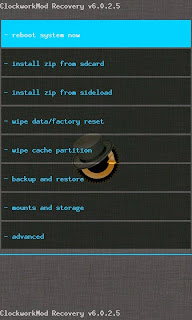
=> Scroll to Yes and wait while the process completes.

=> After the jargons completes, select reboot system now.
=. And voila!! Your phone is finally rooted.
Check the app list on your phone and confirm there is an app Superuser installed. Start it and it would prompt the following
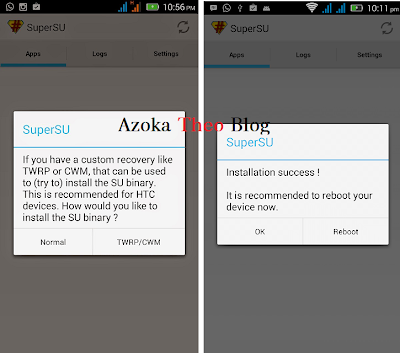
Click Normal and sit back and watch. It would then prompt you to reboot after which you should click ok. Now, Your phone is finally rooted.
If this doesnt work for you, click here for another method.
If this doesnt work for you, click here for another method.
Questions? The comment box asap! :)

Available link for download

Wednesday, February 15, 2017
HOW TO MAKE CWM FOR MTK DEVICES Tecno infinix gionee e t c
HOW TO MAKE CWM FOR MTK DEVICES Tecno infinix gionee e t c
CWM is a custom recovery that allows you to perform certain operations restricted by the stock recovery. It allows you to backup and perform special tricks just like i discussed in this post here . Mtk devices are devices running Mediatek chips. It is mostly run by chinese devices which offer low-budget and pocket friendly devices which include Tecno, Infinix, Innjoo, Gionee e.t.c.
NB: This method does not work on Android 5.0 and later devices.TOOLS
Before we begin, you will need to download the following:
=> ADB Drivers - I would recommend installing PDA net as it installs any adb driver required. Download it here
=> Mtk Droid Tools - Download MTK Droid Tools here

PROCEDURES
=> Install PDA Net on your PC and follow the procedures it prompts.
=> Put your phone in USB Debug Mode and Connect it to your PC
=> Start MtkDroid tools and wait for it to detect your device

=> Now, click on the root, backup and recovery tab, then select To use boot from phone and then click Recovery and Boot . A dialog box would appear and prompt To make CWM recovery automatically , select yes


=> Finally the tool will ask to reboot to recovery mode, click yes and the device will boot to CWM recovery and it can be seen that installation was successful

Any Questions? Drop by the comments section and it will be promptly answered.
Available link for download
Tuesday, January 17, 2017
Nominal Roll 2017 H S E S S L C MARCH 2017 Report File Setup
Nominal Roll 2017 H S E S S L C MARCH 2017 Report File Setup
H.S.E & S.S.L.C MARCH 2017 Report File Setup :
32 BIT : Click Here

64 BIT : Click Here
INSTRUCTION : Click Here
Available link for download
Subscribe to:
Posts (Atom)