Showing posts with label devices. Show all posts

Sunday, March 5, 2017

Flash Unbrick or Upgrade MediaTek MTK Devices With WiseLinkTool MultiPortDownload Tool

Flash Unbrick or Upgrade MediaTek MTK Devices With WiseLinkTool MultiPortDownload Tool


This is another tool which can be used in flashing our MediaTek MTK devices. It works basically like SP Flash Tool but can read scatter files which are either in .txt or .sca format.
Has multi port option which can flash many similar devices at same time.
OK now lets go to how to use WiseLinkTool


Download WiseLinkTool v4.1.0.39 or WiseLinkTool v4.6.4.44
Download and install MTK USB VCOM drivers from here or here orhere
Extract, install and launch by opening WiseLinkTool.exe inside installation folder
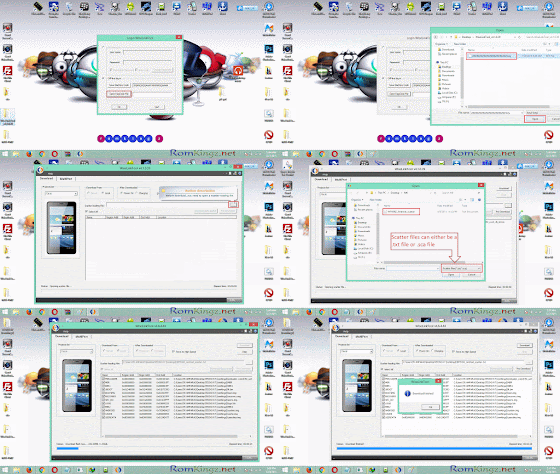
Click on Open RegCode File Navigate and select  ZZZZZZZZZZZZZZZZZZZZZZZZ.key from extract folder
Click OK

Now Click on the button with ... to load scatter file (Scatter files can either be in .txt or .sca format)
Navigate and select the scatter file of the device you want to flash/unbrick or upgrade.
Tick the required partition to flash (Tick all for complete flash or upgrade)
Click Download Button and connect phone to PC

When process is complete,the phone will reboot or start charging depending on the option selected After Downloaded Tab.
Note that first boot after flash 
Congrats! you have successfully flashed your device

Common Errors after flashing a device
If you have null or invalid imei number after flash, restore with mtk engineering mode app, chamelephon, SN Write Tool or mtk droid tools
If device bootloops after flash process, do a factory reset from recovery.
If screen of device divides/displays funny colours when boot up, use another ROM or Firmware

.................................................................................................................... 

MultiPortDownload Tool

How to flash/unbrick MTK smart phones using MultiPortDownload Tool

Multiport Download Tool (MDT) is just another great alternative tool used for flashing MTK smart phones. Follow the steps below and learn how to use Multiport Download Tool to flash or unbrick MTK devices.

we takes no take responsibility on whatever may happen to your device.
Do at this your own risk


Download MultiportDownloadTool for smart phones from here (Latest version preferable)
Download and install smart phone drivers from here

Extract the MultiportDownloadTool you downloaded
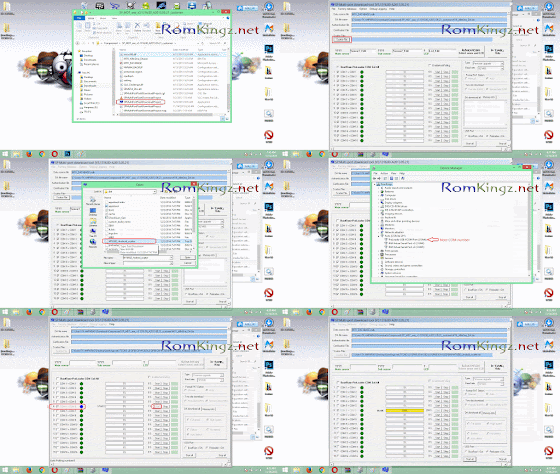
Launch SPMultiPortFlashDownloadProject.exe

If you get a pop up showing Fail (its because the DA file has not been loaded),


Just click OK
To load DA file, click on File and select Open Download Agent Filethen navigate to the folder of MultiportDownloadTool and selectMTK_AllInOne_DA.bin


Click Scatter file button
Navigate to the folder containing the ROM 
Select the scatter file found inside (eg. MT6582_Andriod_scatter)


Under DA Download All Section,
Tick high speed and Auto detect

Open Device Manager by clicking on Help and select Device Manager
Double Click on Ports (COM & LPT)
Connect the device you want to flash
Note the COM Port number
Disconnect the device
On some versions of MultiportDownloadTool , all you need is to click Scan button and connect the device.The COM port will be detected automatically.


Go back to MultiportDownloadTool and tick the COM Port noted
Click Start button on the corresponding port number ticked.
Now connect the device with battery inserted.
Flash process begins when you see a yellow progress bar
The process is complete when you see DL OK and 100% in the progress bar.


Check out the screen shots of the full procedure on how to use sp multi port download tool below


ERRORS!!

If you see a pop up showing FAIL with Cannot find CheckSum.ini file.....  after clicking Start button,


Download CheckSum_Gen.exe from here

Copy it to the folder containing the scatter file
Launch CheckSum_Gen.exe 


Wait for the process to complete and he CheckSum.ini file (process takes about 30seconds)


You can now click Start button to flash your device.
Crdt: #romkingz.net

Available link for download

Read more »

Friday, February 24, 2017

HOW TO ROOT ANY STUBBORN MTK TECNO INFINIX e t c devices

HOW TO ROOT ANY STUBBORN MTK TECNO INFINIX e t c devices


Devices these days are getting a reputation for being hard to root. Some apps like Root Genius (you can read about it here) have tried to simplify the rooting procedures. But if your phone falls into the "tough phone, to hard to root" category, dont worry you have come to the right place. Lets get started. This tutorial is only for mtk devices strictly.
TOOLS
=> CWM installed on your phone - You can install CWM on your phone by following the procedure here
=> SuperUser SU zip - Download here
    ANDROID ROOT

    PROCEDURES
    => Copy the downloaded Super SU.zip file to the root folder of the SD card of your phone.
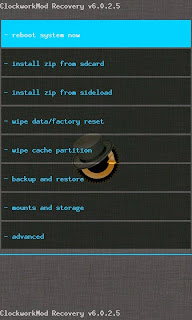
    => Now reboot your phone to CWM, you can try any of the methods listed here
    => Scroll to install zip from SD Card option

    CWM 2

    => Scroll down to the SuperSU file you copied to your SD card and select it with the power button.
    => Scroll to Yes and wait while the process completes.

    CWM

    => After the jargons completes, select reboot system now.
    =. And voila!! Your phone is finally rooted.

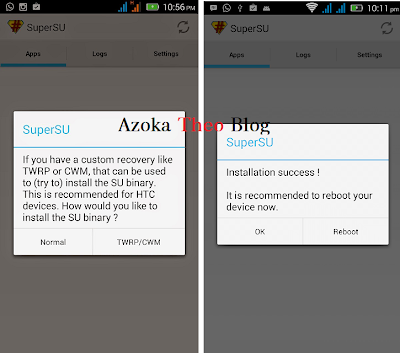
    Check the app list on your phone and confirm there is an app Superuser installed. Start it and it would prompt the following 

    SuperUser Confirmed 

    Click Normal and sit back and watch. It would then prompt you to reboot after which you should click ok. Now, Your phone is finally rooted.

    If this doesnt work for you, click here for another method.

    Questions? The comment box asap! :)


    Available link for download

    Read more »

    Sunday, February 19, 2017

    May 2016 Cheapest and most affordable subscription for Android and all devices

    May 2016 Cheapest and most affordable subscription for Android and all devices


    Hello guys, I’m going to try my possible best to present you with the cheapest and affordable data plans you should go for in this month of May. Your phone is not smart enough until it is data enabled. To make this easier for you, I’m going to divide every internet user into 3 categories.
    Simple User Data Plans
    Heavy User Data Plans and
    Ordinary User Data Plans

    Simple User Data Plans:

    Glo : Glo seems to offer one of the cheapest data subscription in which you can get 1.5GB for N1,000 or 4.5GB for N2,000 .

    Airtel: Airtel network is one of the fastest networks in most locations and I can tentative vouch for it. But every other Airtel data plans zaps except the weekend plans of N100 for 1GB and their blackberry plan. If you are a new subscriber on Airtel network, then I’ll recommend you go for “Welcome to Airtel plan” that gives you 4GB for N1,500 + 2600 extra credit. See more info about it here .
    Airtel Blackberry Plan: I’m sure by now you are aware that you can use Airtel Blackberry plan of
    3GB for N1,000 on your Android devices. If you are new to it, simply check here for more details.
    MTN BBLITED : For now MTN BIS is not working on Android, hopefully before the month run out, a better way to fix it will be unveiled.
    Glo Blackberry Plan: Glo Blackberry plan has been reduced to 3GB For N1,400 and N1,500 respectively. I tried the N1,400 and it zaps data a lot while the N1,500 plan doesn’t zap at all.
    To Subscribe for any of this plan;
    Dial *777*21# For 3GB For N1,400
    Dial *777*23# For N1,500 or dial *777# and follow the prompt respectively. It works on BB10 and Android who’s IMEI has been tweaked.
    Ordinary User Data Plan:

    This one is for those who don’t consume much on their devices, they merely download, just to surf the net, read news and socialize and turn off their data. We have a plan that equally suits you.
    Glo N1,000 for 1.5GB : Dial *777# and follow the prompt. No strange settings required.
    Etisalat N1,000 for 1GB : Dial *229*2*7#. No strange settings required.
    MTN 1.3GB for N1,000 . Send 106 to 131
    MTN 3.75GB for N2,000: Send 110 to 131 and it will be activated
    Airtel 1GB for N1,000 : dial *496# it will last you for 30 days.
    Heavy User Data Plans
    This plan works best for those that love to download all the time…
    MTN daily unlimited Plan: When it is unlimited, we don’t keep quiet because it’s going to solve a lot of online downloading problem. I’ve used this plan before and I can tell you that it’s not capped. For the first 6 hours of my use, I downloaded 8GB, the rest is history. Unfortunately, not all of you are eligible for this plan.
    To get this plan, load your MTN line with N150 and dial *567*59# . It works on all smartphones, PC and iOS.
    Airtel Unlimited Night Plan : Airtel network is strong in most locations and strongest during the night hour. This plan is unlimited at night; no speed throttling, and it is download as you want.
    How to Subscribe to The Airtel Night Plan:
    => For 1hour plan, dial *481*1# and it cost N100
    => For 3hours plan, dial *481*2# and it cost N300
    => For 6hour plan, dial *481*3# and it cost N500.
    NB: This data plan works on all devices, be it Java phones, Symbian, Android, iPad, iPad, PC.
    Night Plans
    Glo 1GB for N200 (12am – 5am)
    Glo 3GB for N500 for Sat and Sun + 7 Nights
    Are you still confuse on what data plans to use? Ask me your questions…


    Available link for download

    Read more »

    Saturday, February 18, 2017

    How To Get Back Facebook App On Blackberry 10 Devices

    How To Get Back Facebook App On Blackberry 10 Devices


    early this year, CEO announced the discontinued support for both whatsapp and facebook on all blackberry devices, even the BB10 series were not excluded from this major set back, many thought is was a hoax, but now reality has dawned on them, so today i will be writing on alternative to use facebook app on BB10 device, I will make this article as brief as possible.

    Also read: See why 2.6 Million Subcribers Dump MTN & 52,251 Dump Etisalat Network

    Alternative to facebook app

    Facebook lite app came out some years back and it was introduced to those who uses 512 mb of ram seeing that the original facebook app takes a huge part of the ram, and now its about to be a life safer to BB10 devices.

    -so download and install facebook lite

    -input your login details and sign in and you are good to go.


    Available link for download

    Read more »

    Wednesday, February 15, 2017

    HOW TO MAKE CWM FOR MTK DEVICES Tecno infinix gionee e t c

    HOW TO MAKE CWM FOR MTK DEVICES Tecno infinix gionee e t c


    CWM is a custom recovery that allows you to perform certain operations restricted by the stock recovery. It allows you to backup and perform special tricks just like i discussed in this post here . Mtk devices are devices running Mediatek chips. It is mostly run by chinese devices which offer low-budget and pocket friendly devices which include Tecno, Infinix, Innjoo, Gionee e.t.c.

    NB: This method does not work on Android 5.0 and later devices.
    TOOLS
    Before we begin, you will need to download the following:
    => ADB Drivers - I would recommend installing PDA net as it installs any adb driver required. Download it here
    => Mtk Droid Tools - Download MTK Droid Tools here

      mtk

      PROCEDURES
      => Install PDA Net on your PC and follow the procedures it prompts.
      => Put your phone in USB Debug Mode and Connect it to your PC
      => Start MtkDroid tools and wait for it to detect your device

        cwm 2

        => The yellow logo at the bottom left corner indicates that your device is rooted, so click the root button and wait until the yellow logo changes to green. (If nothing happens after five minutes close the application and start it all over again and repeat)

        => Now, click on the root, backup and recovery tab, then select To use boot from phone and then click Recovery and Boot . A dialog box would appear and prompt To make CWM recovery automatically , select yes
        cwm 3 

        => The tool will then create CWM and then another prompt would pop up and ask, Install created Recovery to Phone? , click yes
        cwm4

        => Finally the tool will ask to reboot to recovery mode, click yes and the device will boot to CWM recovery and it can be seen that installation was successful

        cwm

         Any Questions? Drop by the comments section and it will be promptly answered.

        Available link for download

        Read more »

        Thursday, January 26, 2017

        Ntel 4G tarrif data plans and compatible devices

        Ntel 4G tarrif data plans and compatible devices


        Those who have gotten the sim should be test running this network right about now… but if you haven’t gotten your own sim, chillax, it will get to you. These are the details of ntel Tarrif Plans as seen below;

        Plan
        Amount(N)
        Validity
        Benefits
        Smart Phone Starter
        N1,000
        3 days
        Unlimited data,30minutes  voice calls, SMS
        Standard Plan
        N2,400
        7 days
        Unlimited Data,70minutes calls, SMS
        Monthly plans
        N9,000
        30 days
        Unlimited data, 300 minutes calls, SMS

        Ntel also listed some compatible smartphones that will work with their sim which includes

        TecnoBoom J8
        TecnoCamon C5
        Samsung Galaxy S6 Edge
        Infinix Zero 3
        Infinix Note 2 (2GB Ram version)

        But before you start celebrating about it, Fair Usage Policy applies to the above tariff plans. See the Fair Usage Policy here.

        Is this ntel tariff a Yea or Nay for you?


        Available link for download

        Read more »