Showing posts with label any. Show all posts
Showing posts with label any. Show all posts
Tuesday, March 14, 2017
Translate blog post to any language using Google Language Translate widget on your blog
Translate blog post to any language using Google Language Translate widget on your blog
The google language translating widget, helps your readers Translate your blog post to any language among the 12 languages provided. This will make non English speak country also visit your blog, since they can adjust your blog write up to there language for understanding. So let no one say "I dont understand English that why I dont visit your blog".

It can also auto detect language and also translate your blog post to the reader chosen language.
Follow the steps below to add Google language translating widget to blogger.
Step 1.
Login in to your blogger dashboard; select LayOut then next click on AddWidget.

Step 2
Scroll down to HTML/JavaScript.

Now highlight your cursor if on screen touch smartphone simply long press to see the select and copy option.
Now paste the below code you copied into the blank box you see after clicking on AddWidget.
<script type="text/javascript">function showHide(shID) {if (document.getElementById(shID)) {if (document.getElementById(shID+-show).style.display != none) {document.getElementById(shID+-show).style.display = none;document.getElementById(shID).style.display = block;}else {document.getElementById(shID+-show).style.display = inline;document.getElementById(shID).style.display = none;}}}</script><style>.google_translate img {margin: 10px 20px 0px 20px;height: 24px;width: 24px;}.google_translate:hover img {filter:alpha(opacity=0.30);-moz-opacity: 0.30;opacity: 0.30;border:0;}.more {display: none;a.showLink, a.hideLink {text-decoration: none;color: #0880C4;padding-left: 18px;background: transparent(down.gif) no-repeat left; }a.hideLink {background: transparent url(up.gif) no-repeat left;color: #0880C4;}a.showLink:hover, a.hideLink:hover {color: #0880C4;}</style><div><a class="google_translate" href="#" target="_blank" rel="nofollow" title="English" onclick="window.open(http://translate.google.com/translate?u=+encodeURIComponent(location.href)+&langpair=auto%7cen&hl=en); return false;"><img alt="English" border="0" align="absbottom" title="English" height="24" src="https://blogger.googleusercontent.com/img/b/R29vZ2xl/AVvXsEg_EoBdDqbSJlQ3vXAgCWlFyaSHFtDBanJkvF-Ax05CeL_M2AHr4h0Cjw8sMUhmoC9YogG6nUhNRi5PJWo2iR6FuPV6i_ZSvgY_khzRz_GpNelUsu4RRjE4NYu6kS8vWxMVwxL4qWODitPy/s1600/United+Kingdom(Great+Britain).png" style="cursor: pointer;margin-right:8px" width="24"/></a><a class="google_translate" href="#" target="_blank" rel="nofollow" title="French" onclick="window.open(http://translate.google.com/translate?u=+encodeURIComponent(location.href)+&langpair=auto%7cfr&hl=en); return false;"><img alt="French" border="0" align="absbottom" title="French" height="24" src="https://blogger.googleusercontent.com/img/b/R29vZ2xl/AVvXsEh1WR7yc6THy3UaDDD4ZckBSIUtWSZz1AdrcpkGNY81TVrYbKswdWiNbKPLH2UEIP2znBG6Lj5uLZG2NaWxLL_bsKW9xrsvN0q4pdtmxquIwmyEi3YOd3C95-GRcpIl9WpuLdX6QZxojfvz/s1600/France.png" style="cursor: pointer;margin-right:8px" width="24"/></a><a class="google_translate" href="#" target="_blank" rel="nofollow" title="German" onclick="window.open(http://translate.google.com/translate?u=+encodeURIComponent(location.href)+&langpair=auto%7cde&hl=en); return false;"><img alt="German" border="0" align="absbottom" title="German" height="24" src="https://blogger.googleusercontent.com/img/b/R29vZ2xl/AVvXsEgkG4Q_P1wZwRe4tLtUnkTwBQQ0oQmEswgdnpQz9gPbAS075rrpvVqYg-msMaO819q7YZ29_yyjmNz9hIlShJsWCGPF3Jc-6YjVLy0SX1sKGluuToX7wjeOlo5CWr2DJT_ZgY-79xgKCPMG/s1600/Germany.png" style="cursor: pointer;margin-right:8px" width="24"/></a><a class="google_translate" href="#" target="_blank" rel="nofollow" title="Spain" onclick="window.open(http://translate.google.com/translate?u=+encodeURIComponent(location.href)+&langpair=auto%7ces&hl=en); return false;"><img alt="Spain" border="0" align="absbottom" title="Spain" height="24" src="https://blogger.googleusercontent.com/img/b/R29vZ2xl/AVvXsEgmYnpVR_mWxzvcK2771JRAS8VAqz-EdBNBhPzFnZWELfdJsWX3uzku5HroyLu683C100OYYsD-M1bLh_D3dYdwFDtBPS5YlMzkS78davnyu0pVzm0TL5QSEmbia_qArqXbJH2lqq9hr5yW/s1600/Spain.png" style="cursor: pointer;margin-right:8px" width="24"/></a><a href="#" id="example-show" class="showLink"onclick="showHide(example);return false;">More</a><div id="example" class="more"><a class="google_translate" href="#" target="_blank" rel="nofollow" title="Italian" onclick="window.open(http://translate.google.com/translate?u=+encodeURIComponent(location.href)+&langpair=auto%7cit&hl=en); return false;"><img alt="Italian" border="0" align="absbottom" title="Italian" height="24" src="https://blogger.googleusercontent.com/img/b/R29vZ2xl/AVvXsEggCSHeZxKcbkA1kBq5dOxLZvbRpOA3k-AsOXwNALEZQwsSaAE-9hUS7Faya1EETpK__27diy9MXghFMSHAYMJqtie_8FwHWSp1f0rijf6pAY_gwThMLMaM-1RKEevTcRXnQDfW8tpJyD-I/s1600/Italy.png" style="cursor: pointer;margin-right:8px" width="24"/></a><a class="google_translate" href="#" target="_blank" rel="nofollow" title="Dutch" onclick="window.open(http://translate.google.com/translate?u=+encodeURIComponent(location.href)+&langpair=auto%7cnl&hl=en); return false;"><img alt="Dutch" border="0" align="absbottom" title="Dutch" height="24" src="https://blogger.googleusercontent.com/img/b/R29vZ2xl/AVvXsEhSWmgjIO_sHi3vPFErCeEDhYzCq_bBC4RcmmfinzVx6_L0Uu2-6w7u9E1Y1t5oAur8zHvbDVUSqtl2RCYHMsXHuIuf4Hwl5oMQ86N3_5dxfdIntD6T1FkZV68tuPlc-zFQVYOf0HgzYZ95/s1600/Netherlands.png" style="cursor: pointer;margin-right:8px" width="24"/></a><a class="google_translate" href="#" target="_blank" rel="nofollow" title="Russian" onclick="window.open(http://translate.google.com/translate?u=+encodeURIComponent(location.href)+&langpair=auto%7cru&hl=en); return false;"><img alt="Russian" border="0" align="absbottom" title="Russian" height="24" src="https://blogger.googleusercontent.com/img/b/R29vZ2xl/AVvXsEhf7m8tzVlRmoIr81lVPnM88ufWYJU-52D3J-si-Fql4JWA-fKJUQUBJIXFiIYwHcrj5DXqMKe2m5-Iq9Nf1nwEXnBnHv_cbJxVfjnjnq7DsYArzDLYXmFvfsD6atxg_Irn8dJyIjS6PHSr/s1600/Russian+Federation.png" style="cursor: pointer;margin-right:8px" width="24"/></a><a class="google_translate" href="#" target="_blank" rel="nofollow" title="Portuguese" onclick="window.open(http://translate.google.com/translate?u=+encodeURIComponent(location.href)+&langpair=auto%7cpt&hl=en); return false;"><img alt="Portuguese" border="0" align="absbottom"title="Portuguese" height="24" src="https://blogger.googleusercontent.com/img/b/R29vZ2xl/AVvXsEj2QoyxDgPTjv3fiWtOTb-trdT42eGhYYVS1HdIj6HMN1Y31fDjmjkt-iY9jyfYdGSvEoYFIkOqicyK1eqEsPkQ5HLnwrTSs6411JRTVLmPlHkwDuudZSlLtI2TFZvPUxcE9Ht5sqnl37oQ/s1600/Brazil.png" style="cursor: pointer;margin-right:8px" width="24"/></a><br /><a class="google_translate" href="#" target="_blank" rel="nofollow" title="Japanese" onclick="window.open(http://translate.google.com/translate?u=+encodeURIComponent(location.href)+&langpair=auto%7cja&hl=en); return false;"><img alt="Japanese" border="0" align="absbottom" title="Japanese" height="24" src="https://blogger.googleusercontent.com/img/b/R29vZ2xl/AVvXsEjl8VyTJpa6vCoPItOlRd9IruKw03Yyk7zoNGvl5TXZfZbMiZ4RudfNa807rHzA2rBbhVJSPOvWJoVkz5Q1_rMybj9nfCBcHFjg_SfCQTkQ5gLCBEow7vXoWANcJRmgMcdCGYk1ZdsqE0Sb/s1600/Japan.png" style="cursor: pointer;margin-right:8px" width="24"/></a><a class="google_translate" href="#" target="_blank" rel="nofollow" title="Korean" onclick="window.open(http://translate.google.com/translate?u=+encodeURIComponent(location.href)+&langpair=auto%7cko&hl=en); return false;"><img alt="Korean" border="0" align="absbottom" title="Korean" height="24" src="https://blogger.googleusercontent.com/img/b/R29vZ2xl/AVvXsEiniG-SsgwvhwEhclBXgKnj_oI9sPcG_0p5zG22itUmOY1y1rvRkeQO3eEUhO0a72de1UJOKAJ7wBjtYTKJ3BvzmaJe_a-7p9wrcajq01mDPKdR3Yzq1g6e1gXwXfCCFUBX4U1vb8oXePC3/s1600/South+Korea.png" style="cursor: pointer;margin-right:8px" width="24"/></a><a class="google_translate" href="#" target="_blank" rel="nofollow" title="Arabic" onclick="window.open(http://translate.google.com/translate?u=+encodeURIComponent(location.href)+&langpair=auto%7car&hl=en); return false;"><img alt="Arabic" border="0" align="absbottom" title="Arabic" height="24" src="https://blogger.googleusercontent.com/img/b/R29vZ2xl/AVvXsEgj3IBgKtLW4E2fMeOpMBEHa_VPo2xTB4PKJawmeGPiNIYUo0hxlpFJb8Wr09EY8Lx1SiXQHtCLoxxdA6jpQGaP1OL7ntnFRu_p4fYHMo8JzoQl6Ch3vpg655GhOZWcFlGByP3CP5KTYFBa/s1600/Saudi+Arabia.png" style="cursor: pointer;margin-right:8px" width="24"/></a><a class="google_translate" href="#" target="_blank" rel="nofollow" title="Chinese Simplified" onclick="window.open(http://translate.google.com/translate?u=+encodeURIComponent(location.href)+&langpair=auto%7czh-cn&hl=en); return false;"><img alt="Chinese Simplified" border="0" align="absbottom" title="Chinese Simplified" height="24" src="https://blogger.googleusercontent.com/img/b/R29vZ2xl/AVvXsEgYvrKBEs9-geogyz4WnBqk0atUgubBTFdN9AooX98-5mQx-CUOVk3aKtTP5OafvmNcmeO0eilz2fDiugJo84-tkYR_QTH4W9jQBh8kHJGhq8erk5SFsrslC9NfYQ0Bw24JYsqiwnwlag7A/s1600/China.png" style="cursor:pointer;margin-right:8px" width="24"/></a><p><a href="#" id="example-hide" class="hideLink"onclick="showHide(example);return false;">Hide</p>
</div>
</div>
NB; Never you write any thing in the title box provided above the blank box.
Step 4
Click on Save to save the changes you have made in your blogger blog layout.
Comment are attended to immediately, do not hesitate to ask questions and let us know if this trick helped you.
posted from Bloggeroid
Available link for download

Any Video Converter 6 0 6 Full Version
Any Video Converter 6 0 6 Full Version
 |
| Any Video Converter |
Any Video Converter 6.0.6 Full Version we sometimes difficult to convert video format that sometimes can not be played in some media such as PC, laptop, or Smartphone. but now there Any Video Converter which can facilitate you to convert audio files and video that can be played in other media and also reduce the size of its original size. and you too can enjoy the many features provided such as Play Video, Video Record, Convert Video, and others.
Features Any Video Converter 6.0.6
- Compatible with Windows Vista and 7, Windows 8, will be compatible with 64-bit OS.
- User interface available in 20 languages.
- rip DVD disc and DVD folder to video for iPod, PSP, Zune and more.
- Rip copy protected DVD movies directly without removing DVD copy protection.
- Convert all kinds of video formats including high-defination video.
- Convert video to all portable media players and mobile phones.
- Extract audio from any video and save as MP3 / WMA for your mp3 player.
- More on website
How to Install
- Extract using WinRAR
- Install as usual until completion
- Open the folder and run the Keygen keygen.exe
- Email content and also the name to be registered
- click generate
- Open Any Video Converter and click on the key image in the upper right corner
- Fill in the email data and Serial been made earlier
- finished
Download Link
| Partagora | http://adf.ly/1gWpWm |
| Kumpul Bagi | http://adf.ly/1gWpWn |
Pass : softwarefreein
Available link for download
Tuesday, March 7, 2017
Sunday, March 5, 2017
How To Verify any Bank Account Number in Nigeria
How To Verify any Bank Account Number in Nigeria
Let us imagine three scenarios:
1.You want to send money at the ATM, then you are unsure of the account number, you now have to call/WhatsApp/Ping the owner of the account to confirm but everybody at the ATM queue is screaming at you. You just stand here wondering why bad things happen to good people.
2. You are at the bank, you want to send money to someone, you are unsure of the account number, so you head up to the customer care section but there are about 20 people on the queue there too. *deep sigh*
3. You want to use the mobile banking app on your phone to transfer money, for some reason the app doesnt verify the account number for you, you decide its better to just postpone it and confirm later.
This has to stop. Theres a solution to all these problems. Its an app called Nigerian Bank Account Verifier.


HOW IT WORKS:
=> Download the App (Check download link at the end of the post)
=> Install the app and Open it
=> Select the bank name
=> Enter the 10 digit Account Number
=> Click Verify
=> It will show you the Account Owners full names.
WHY YOU SHOULD USE IT:
=> Prevent Identity theft
=> Prevent Scam, find out real owners of account numbers.
=> Save yourself the stress of facing above scenarios
=> Prevent sending money to someone elses account.
Recommended For You:
=> How To Find PostCode/Zip Code in Nigeria
=> How to Check BVN on Phones in Nigeria
This is a very nice app, and i recommend it for everyone. Personally, its a life saver app. The only issue is that its only available for Android devices for now, hopefully the developer will add other platforms to the list soon.
Download Account Verifier from Google Playstore Here (or from Alternative Fast Mirror here)
Available link for download
Saturday, February 25, 2017
How To Check BVN Details On Any Mobile Phone MTN Airtel Etisalat
How To Check BVN Details On Any Mobile Phone MTN Airtel Etisalat
Checking your BVN details on MTN, Airtel and Etisalat just got easier. If you have been having problems accessing where you stored the Bank Verification number when you need it ASAP, dont worry, You can now check your BVN details on any mobile phone, be it a Nokia Torchlight or an iPhone 6s. All you need to do is dial a code on the phone with the number you registered with and your BVN details will be sent to you via SMS.
How To Check Your BVN (Bank Verification Number):
To check BVN details on any mobile phone, follow these steps:- Just Dial *565*0# on your mobile phone with the number you registered with.
- Youd receive a confirmation message with your BVN details delivered to you.
- A token fee of N10 will be deducted from your account balance.

Remember, BVN registration ends on 31st October 2015. Hurry up and register if you havent. Dont fall victim for scam text and e-mails as your bank will NEVER ask you for your BVN details via a text nor e-mail. Dont fall victim
Available link for download
Friday, February 24, 2017
HOW TO ROOT ANY STUBBORN MTK TECNO INFINIX e t c devices
HOW TO ROOT ANY STUBBORN MTK TECNO INFINIX e t c devices
Devices these days are getting a reputation for being hard to root. Some apps like Root Genius (you can read about it here) have tried to simplify the rooting procedures. But if your phone falls into the "tough phone, to hard to root" category, dont worry you have come to the right place. Lets get started. This tutorial is only for mtk devices strictly.
TOOLS
=> CWM installed on your phone - You can install CWM on your phone by following the procedure here
=> SuperUser SU zip - Download here

PROCEDURES
=> Copy the downloaded Super SU.zip file to the root folder of the SD card of your phone.
=> Now reboot your phone to CWM, you can try any of the methods listed here
=> Scroll to install zip from SD Card option
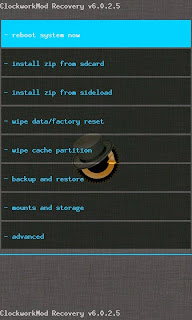
=> Scroll to Yes and wait while the process completes.

=> After the jargons completes, select reboot system now.
=. And voila!! Your phone is finally rooted.
Check the app list on your phone and confirm there is an app Superuser installed. Start it and it would prompt the following
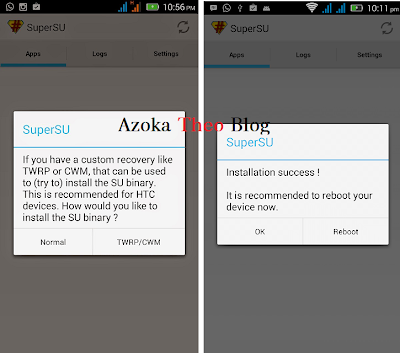
Click Normal and sit back and watch. It would then prompt you to reboot after which you should click ok. Now, Your phone is finally rooted.
If this doesnt work for you, click here for another method.
If this doesnt work for you, click here for another method.
Questions? The comment box asap! :)

Available link for download
Sunday, February 19, 2017
Friday, February 17, 2017
HOW TO CHANGE IMEI OF ANY ANDROID PHONE Updated!!
HOW TO CHANGE IMEI OF ANY ANDROID PHONE Updated!!
The need for this tutorial is to enable those of you who want to rock GLO BIS on your android phones as that is the cheapest and most sensible subscription plan to browse on your android smartphones in Nigeria.
Disclaimer: IMEI change is illegal and voids the warranty of your phone. I am not responsible for any problem you create after this (though i may be willing to help) and in case you brick your device, OYO may be your case. So, follow the steps accurately.
Now, lets get down to business.

HTC PHONES
- Google/Bing how to root your phone, youd find tons of methods.
- Download this zip file from here and extract to your desktop
- Make sure you have adb drivers on your PC, if you are not sure download PDA Net from here
- Open command prompt and type the following
cd desktop
cd platform-tools
fastboot.exe Press Enter after typing each of the statements as seen below.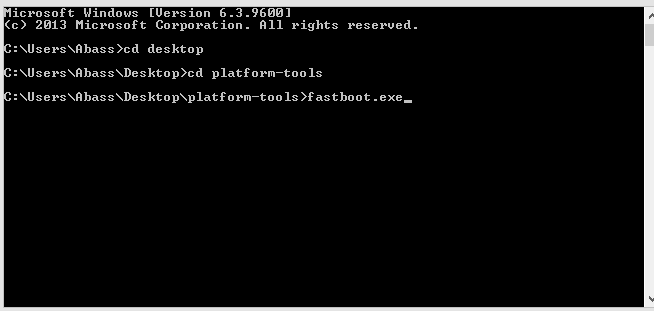.png "HOW TO CHANGE IMEI OF ANY ANDROID PHONE")
Dont close the Command Prompt!!
=> now boot your HTC to bootloader by pressing the power button + the Vol down button till a sreen comes up.
=> connect your phone to your PC
=> In the Command Prompt you left opened, type
fastboot getvar imei This will display your current imei number.=> Now type
fastboot oem writeimei "insert the new imei here without the quotes" and wait for a successful message and dazzall!.TECNO, INFINIX, GIONEE & OTHER MTK DEVICES
NEW METHOD UPDATE!!=> Make sure your phone is rooted, else follow this guide here or use RootGenius from here.
For those using new Lollipop/Marshmallow OS or have just been unable to change their MTK phone imei, download Camelephone.apk from here and install the app. After installing, open the app and grant SuperUser access. Enter the IMEI and save. Reboot the phone and youll find your new imei.
=> Now download Mobile Uncle tool to your android from playstore.
=> Tap Engineer mode and then Engineer Mode (MTK)

=> Tap CDS Information (search well its there), then click radio information and then tap phone 1

AT +EGMR=1,7,"insert imei here with the quotes" NB: Here you type the imei with the quotes. Note that there is a space between AT and +. Also, to change Sim2 change the 7 to 10 i.e AT +EGMR=1,10.........=> Dial *06# to confirm the new imei.
UPDATE: If you want to change your IMEI because of GLO, read this first
OTHER PHONES
For other phones like samsung, lg, sony, asus and all other non mtk devices you can try this method here .Dont forget to drop your comments, questions and suggestions.
Available link for download
Friday, February 10, 2017
Sunday, January 29, 2017
HOW TO INSTALL CUSTOM ROM ON ANY ANDROID DEVICE
HOW TO INSTALL CUSTOM ROM ON ANY ANDROID DEVICE
A few days back, I discussed about Custom ROMs and why you may want one. Today, i will be giving a guide to universal way of installing Custom ROMs on any android device. Keep in mind that rooting and Custom ROMs are different entities. For more on rooting, you can check here. Lets get straight to business....

TOOLS
=> A USB cord
=> A PC (Optional at times)
=> Your rooted Android phone with at least 60% battery charge
=> Custom Recovery image e.g. CWM or TWRP . Read more here.
=>.Full Backup of Your device
=> The Custom ROM in .zip format.
NB: Installing a Custom ROM voids the warranty of your device but is reversible by installing the Stock ROM to the device. Installing the wrong Custom ROM on your device may cause a soft/hard brick rendering your device temporary unusable. Endeavor to always follow the procedures.
PROCEDURE
=> Make a full (Nandroid) Backup of your device ( Download Titanium Backup here)
=> Download the ROM and all indicated .zip on your PC
=>. Connect your handset to your computer
=> Copy the .zip files to the root of your SD card
=> Enable USB debugging on your device
=> Reboot your phone into Recovery mode (you can use MobileUncle or ROM manager)
=> Scroll using your Vol keys and select “wipe data factory reset”, “wipe cache partition” and “wipe dalvick cache”
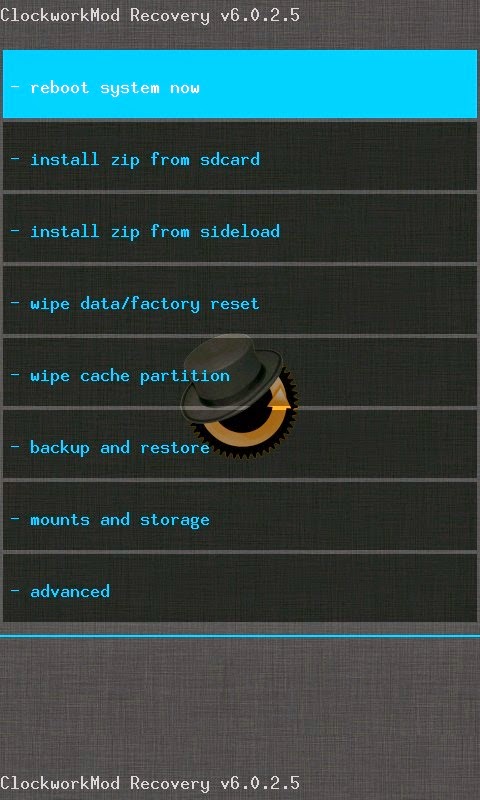
=> At this point your phone will be completely wiped out thats why a backup is recommended
=> Scroll and select "install zip from sdcard" and then "choose zip from sdcard" and select the ROM in .zip format which you saved.
=> Let the installation complete and then go back and select "reboot system now"
At this point, your phone will reboot. Note that the first booting process may take a while before it completes. When your phone finishes booting, your new ROM will already be installed and ready to use.
Remember to always choose stable and trusted ROMs for your device. This increases the chance of updates and bug fixes.
Do you have a ROM youd like to share or a question? Just drop by the comments box and lets get to know.
Dont forget to please share this post with your friends via any of the social media below!
Available link for download
Subscribe to:
Posts (Atom)