Showing posts with label rom. Show all posts
Showing posts with label rom. Show all posts
Monday, March 13, 2017
MIUI 8 China Stable ROM V8 0 3 0 LAICNDG for Redmi 3 Prime Released!
MIUI 8 China Stable ROM V8 0 3 0 LAICNDG for Redmi 3 Prime Released!
Hello Dear MIUIers, Good news, MIUI 8 V8.0.3.0.LAICNDG is now rolling out for Redmi 3/Prime. From now on, many of you should be able to progressively receive the update over-the-air (OTA) on your phones via the Updater app. If you cannot wait, you can download the ROM packages in this thread below. Lets give credits to our developers, alpha testers and beta testers who devote much time, energy to make this gorgeous moment happen. Their contributions shall be honored and respected.

How to Update
1) You can update via OTA if you are using MIUI V5 / MIUI 6 / MIUI 7 stable ROM. Go to Updater on your phone and check for updates.
2) Please do backup important data before flashing. If you flash from Developer ROM to Stable ROM, please wipe all data, otherwise, it might cause serious incompatible issues like FC, no network etc.
3) Check flashing tutorials here: http://en.miui.com/a-232.html
MIUI 8 China Stable ROM Full Changelog
Contacts
> Fix - Contact names couldnt be displayed properly in call history (09-30)
Lockscreen, Status Bar, Notification Bar
> Optimization - Status bar UI and animations (09-30)
MIUI 8 China Stable ROM Download Links
Fastboot
Size : 1251M
MD5 Checksum : 3292404ec34e928bb7a2fe94a738155c
Download Link :
Download Here
Recovery
Size : 932MB
MD5 Checksum : aaa162061d5310739d6e4a2fc5d9390c
Download Link :
Download Here
source
Available link for download

Saturday, March 4, 2017
How to Install Google Play store for Redmi 3 Pro China ROM
How to Install Google Play store for Redmi 3 Pro China ROM
Redmi 3 is a great phone, yet we need Google Play Store, which is not available with the China Stable and China Developer ROM. This a pictorial guide to make it a breeze with installation.
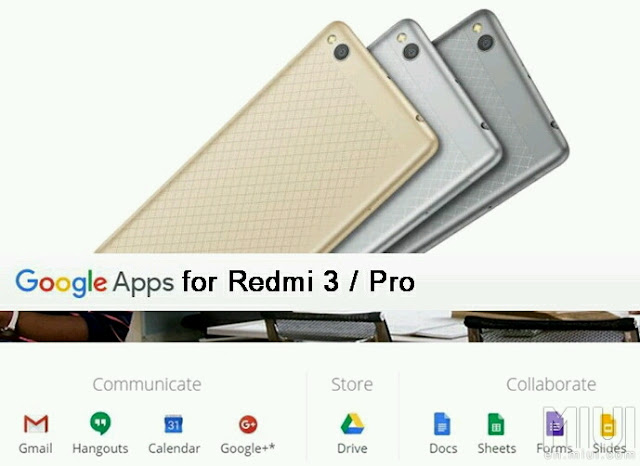
IMPORTANT: Before even going any further, please make sure you enable your settings for installing a 3rd party APK files. Installing APK click the following link: Installing APK file on your Redmi Note 2 for noobies
Features:
Updated V2 of the popular Google Installer by Eric Xiang.
Supports Kitkat, Lollipop & Marshmallow
Easy installation.
FROM YOUR DEVICE:
Just SCAN using your QR scanner to get Google Installer_2.0:

FROM YOUR PC / COMPUTER:
1. Click the flashing Google Installer Icon to download the “Google Installer”.

2. Unzipped and transfer the Google Installer to the internal memory of your Redmi 3 via USB connection.
3. Just follow thru’ the sequence like the illustrations below. Goto File Explorer > APKs > "Google Installer.apk”
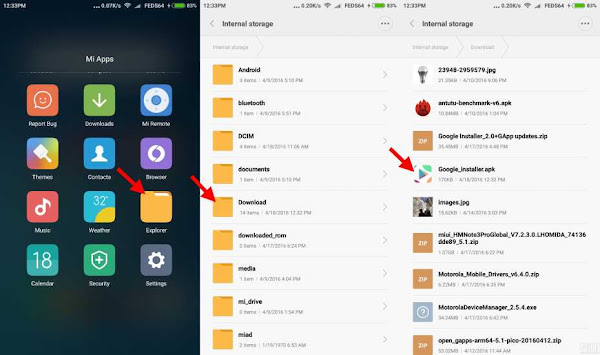
4. Launch the Google Installer icon. Click Blue Circle to start the installation and follow the sequence as shown below:-
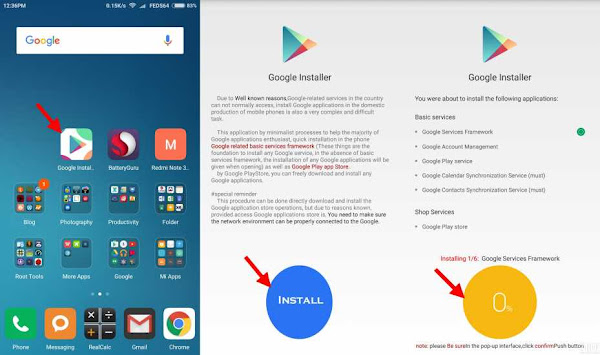
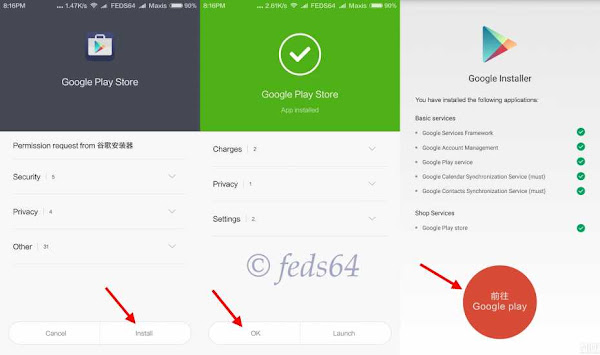
Note: Just click OK and Install, do not click launch at anytime during the installation of the apps.
5. Towards the end of the installation, just follow the illustration to click the RED CIRCLE. and accept the terms, click Allow Google to read SMS, finally go thru the setup of Google sign-in, as follows:-
6. As you can see your phone is busy syncing the contact and other Google Apps and wait depending on your WiFi / Data connection for it to update the core applications before even signing to Google Play Store to avoid getting errors.
Note: For those using Development ROM, Goto Downloads > 3 dots on the top right hand corner > Settings > Unlimited, to avoid not download when you are on Data connection.
7. Now you can go with the signing-in to Google and you could now check the Build version. Google > Settings > scroll up towards the bottom, as shown below:-

8. Now, you have successfully installed Google Playstore.
CREDIT:
Eric Xiang - Google Installer_V2
Source
Available link for download
Sunday, February 26, 2017
MIUI 8 1 V8 1 1 0 MALMIDI Global Stable ROM for Redmi 3S Prime
MIUI 8 1 V8 1 1 0 MALMIDI Global Stable ROM for Redmi 3S Prime
The wait for MIUI 8 is over for the most awaited Global Stable, here is the MIUI 8.1 Global Stable to enjoy the new and enhanced features. Download now!
Download Recovery and Fastboot ROM

MIUI8 Simplify your life
Recovery ROM (1377 MB)
Download
Fastboot ROM (1721 MB)
Download
MIUI 8.1 Global Stable V8.1.1.0.MALMIDI for Redmi 3S/Prime Changelog
Highlights
· New -Three-fingered swipe for screenshots (08-09)· New - The app order in quick sharing is dynamically sorted by usage frequency (09-13)
Phone
· New - Set your Lock screen wallpaper as the conversation background (09-13)Contacts
· Optimization - Opening contacts in Messaging (08-19)Lockscreen, Status Bar, Notification Bar
· Optimization - Saved networks arent shown in the network list (08-05)· Optimization - LED notification light turned off by default in permissions (08-05)
· Optimization - Tap the date in the status bar to open Calendar (09-07)
· Optimization - Swipe down for toggles, rearrange toggles (09-20)
· Fix - Holding a notification didnt give any results (08-19)
· Fix - Notification shade issues in Second space (08-31)
· Fix - Statusbar wasnt working properly with third party themes in some cases (09-01)
· Fix - Issueswith volume level notification in Second space when using earphones (09-05)
· Fix - Weather widget issues (09-20)
Home screen
· Optimization - Changing wallpaper in editing mode (08-19)· Optimization - Hold the empty spot on the Home screen to enter the editing mode (09-06)
· Optimization - Exit recents automatically to take a call (09-13)
· Fix - Issues with icons after reflashing the device (08-08)
· Fix - FC issues in hidden notes (08-15)
· Fix - Device didnt respond after updating and rebooting (09-06)
· Fix - FC issues when switching between themes (09-06)
· Fix - Messaging app icon wasnt marked when messages were received in Second space (09-20)
· Fix - Time flashed in status bar when pressing Home button (09-27)
· Fix - Time wasnt shown in status bar in some cases (09-27)
Gallery
· New - Three-fingered swipe for screenshots (08-09)· New - Slide down to exit fullscreen preview (08-30)
· New - Turn off screenshot sound in screenshot settings (08-31)
· New - The app order in quick sharing is dynamically sorted by usage frequency (09-13)
Settings
· New - Introducing Privacy protection password (10-12)
Permissions Manager
· New - Added permissions for Lock screen and background notifications (08-19)Recorder
· New - Delete synced recordings from the device keeping them in the cloud (09-13)· Optimization - Record music in stereo quality (09-06)
Clock / Calculator
· New - C button clears current calculation, AC clears all history (08-17)· New - Automatic font size adjustments for the numbers you enter (08-17)
· New - Long press the numbers to convert them to the Chinese financial characters (08-17)
· Optimization - Colored backgrounds for Alarm (08-23)
Quick Ball
· New - Swipe to the edge of the screen to hide Quick ball (09-08)Available link for download
Saturday, February 25, 2017
VIDEO Flashing dan Fixing 4G di ROM Global
VIDEO Flashing dan Fixing 4G di ROM Global
Xiaomi dengan produk mereka yang masuk di Indonesia kini terkena Kebijakan pemerintah yaitu TKDN dimana xiaomi harus menghilangkan 4G lte di indonesia. Untuk memperbaikinya bisa ikuti tutor berikut ini
Syarat Dan Bahan :
Syaratnya PC/Laptop OS Windows (64 bit)
MiFlashTool
IDO TWRP
TWRP r.e.c.o.v.e.r.y oleh cofface
Fix_LTE_MIUI8.zip
Alikasi Pendukung
Cara FiX 4G LTE :
- Download Semua Bahan diatas
- Masukan handphone Anda dalam mode download EDL dengan menahan tombol buton vol + Power, kemudian pilih Download
- Menghubungkan Redmi 3/Pro ke PC Anda, jika driver berhasil diinstal telepon Anda akan ditampilkan sebagai Qualcomm HS-USB QDLoader 9008
- Buka MiFlashTool Anda di C:Program FilesXiaomiMiPhone atau di mana pun Anda menginstalnya
- Refresh dan perangkat Anda akan ditampilkan.
- Klik Browse dan pilih mana Anda ekstrak ido-TWRP-3.0.2.0
- Kemudian Klik Flash dan tunggu sampai menampilkan status berhasil
- Setelah selesai flashing, nyalakan telepon Anda ke modus Fastboot dengan menekan tombol [power] + [volume (-)] dan Hubungkan telepon Anda ke PC
- Buka TWRP r.e.c.o.v.e.r.y oleh cofface folder yang Anda sudah ekstrak dan membuka Recovery.bat
- Klik Enter
- Jika driver telepon Anda sudah berhasil diinstal, telepon Anda akan ditampilkan (123123da fastboot) lalu klik enter lagi
- Tunggu hingga proses selesai kemudian klik enter
- lagi menunggu proses untuk menyelesaikan, dan perangkat Anda akan boot ke TWRP
- Hubungkan telepon Anda ke pc dan Salin Fix_LTE_MIUI8.zip ke penyimpanan internal (tidak memasukkannya ke dalam folder apapun)
- Tekan menginstal di TWRP dan pilih Fix_LTE_MIUI8.zip kemudian flash Juga IDO_TWRP.ZIP menunggu sampai ia selesai kemudian Bersihkan cache dalvik
- Reboot, dan menunggu telepon Anda untuk boot, itu akan memakan waktu beberapa menit
- Jika telepon Anda sudah boot, silakan periksa pengaturan jaringan selular dan Tada... Pengaturan LTE dipilih akan ada

Video Tutorial
Berikut ini video tutorial flash dan Fix 4G khusus Redmi 3/pro.
source
Available link for download
Sunday, January 29, 2017
HOW TO INSTALL CUSTOM ROM ON ANY ANDROID DEVICE
HOW TO INSTALL CUSTOM ROM ON ANY ANDROID DEVICE
A few days back, I discussed about Custom ROMs and why you may want one. Today, i will be giving a guide to universal way of installing Custom ROMs on any android device. Keep in mind that rooting and Custom ROMs are different entities. For more on rooting, you can check here. Lets get straight to business....

TOOLS
=> A USB cord
=> A PC (Optional at times)
=> Your rooted Android phone with at least 60% battery charge
=> Custom Recovery image e.g. CWM or TWRP . Read more here.
=>.Full Backup of Your device
=> The Custom ROM in .zip format.
NB: Installing a Custom ROM voids the warranty of your device but is reversible by installing the Stock ROM to the device. Installing the wrong Custom ROM on your device may cause a soft/hard brick rendering your device temporary unusable. Endeavor to always follow the procedures.
PROCEDURE
=> Make a full (Nandroid) Backup of your device ( Download Titanium Backup here)
=> Download the ROM and all indicated .zip on your PC
=>. Connect your handset to your computer
=> Copy the .zip files to the root of your SD card
=> Enable USB debugging on your device
=> Reboot your phone into Recovery mode (you can use MobileUncle or ROM manager)
=> Scroll using your Vol keys and select “wipe data factory reset”, “wipe cache partition” and “wipe dalvick cache”
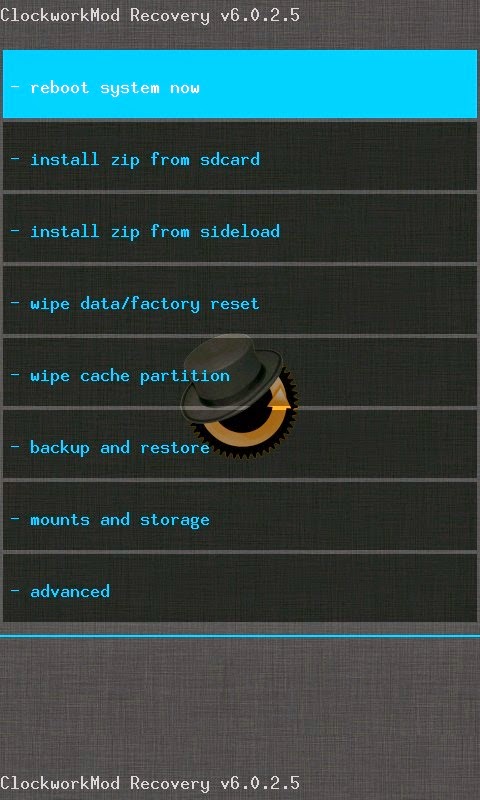
=> At this point your phone will be completely wiped out thats why a backup is recommended
=> Scroll and select "install zip from sdcard" and then "choose zip from sdcard" and select the ROM in .zip format which you saved.
=> Let the installation complete and then go back and select "reboot system now"
At this point, your phone will reboot. Note that the first booting process may take a while before it completes. When your phone finishes booting, your new ROM will already be installed and ready to use.
Remember to always choose stable and trusted ROMs for your device. This increases the chance of updates and bug fixes.
Do you have a ROM youd like to share or a question? Just drop by the comments box and lets get to know.
Dont forget to please share this post with your friends via any of the social media below!
Available link for download
Subscribe to:
Posts (Atom)