Showing posts with label play. Show all posts
Showing posts with label play. Show all posts
Saturday, March 4, 2017
How to Install Google Play store for Redmi 3 Pro China ROM
How to Install Google Play store for Redmi 3 Pro China ROM
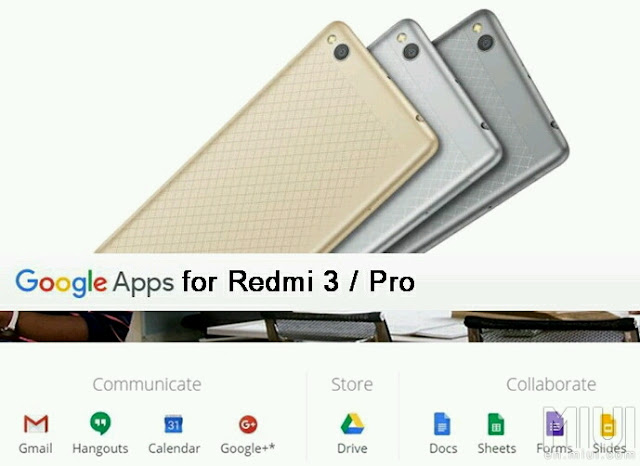
Redmi 3 is a great phone, yet we need Google Play Store, which is not available with the China Stable and China Developer ROM. This a pictorial guide to make it a breeze with installation.
IMPORTANT: Before even going any further, please make sure you enable your settings for installing a 3rd party APK files. Installing APK click the following link: Installing APK file on your Redmi Note 2 for noobies
Features:
Updated V2 of the popular Google Installer by Eric Xiang.
Supports Kitkat, Lollipop & Marshmallow
Easy installation.
FROM YOUR DEVICE:
Just SCAN using your QR scanner to get Google Installer_2.0:

FROM YOUR PC / COMPUTER:
1. Click the flashing Google Installer Icon to download the “Google Installer”.

2. Unzipped and transfer the Google Installer to the internal memory of your Redmi 3 via USB connection.
3. Just follow thru’ the sequence like the illustrations below. Goto File Explorer > APKs > "Google Installer.apk”
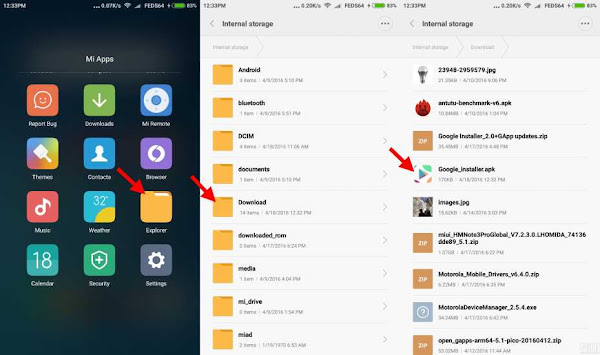
4. Launch the Google Installer icon. Click Blue Circle to start the installation and follow the sequence as shown below:-
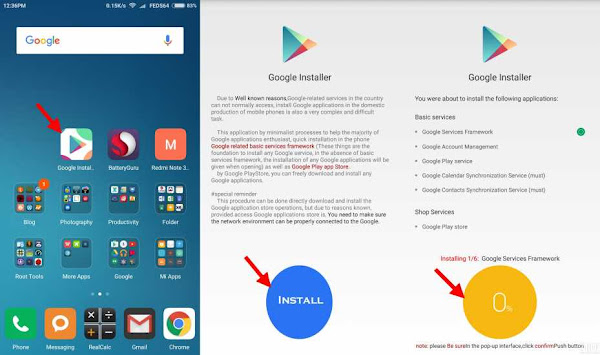
Note: Just click OK and Install, do not click launch at anytime during the installation of the apps.
5. Towards the end of the installation, just follow the illustration to click the RED CIRCLE. and accept the terms, click Allow Google to read SMS, finally go thru the setup of Google sign-in, as follows:-
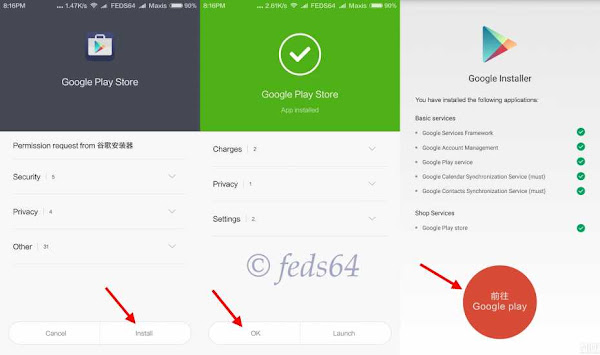
6. As you can see your phone is busy syncing the contact and other Google Apps and wait depending on your WiFi / Data connection for it to update the core applications before even signing to Google Play Store to avoid getting errors.
Note: For those using Development ROM, Goto Downloads > 3 dots on the top right hand corner > Settings > Unlimited, to avoid not download when you are on Data connection.
7. Now you can go with the signing-in to Google and you could now check the Build version. Google > Settings > scroll up towards the bottom, as shown below:-

8. Now, you have successfully installed Google Playstore.
CREDIT:
Eric Xiang - Google Installer_V2
Source
Available link for download

Wednesday, March 1, 2017
Have you noticed the fresh Play Store layout and transitions for search results
Have you noticed the fresh Play Store layout and transitions for search results
Google has formed a habit of tossing us around with regular changes to its Play Store. And now Google is trying its hands on a fresh new shade of green, with a bigger depth of green than the previous one. Have you not seen it? There is also the large uninstall button as well as tweaked list view for apps. What we are hearing now is something quite fresh deploying big cards for apps which could be swiped horizontally through in search results.

So when you want to search for an app, if you tap a result, you will redirected to the fresh view. There you see the present content but rather of in fullscreen, it is tucked up in a card. When you scroll down, the size of the card increases, and when you scroll up, it shrinks back! When you swipe horizontally, right or left, you come within sight of the other results of the search.
Well we can’t say if this is just some brief test or if it is gradually rolling through via a server-side switch. One thing Google has built a reputation is iterating a lot, trying its hands on lot of things, we are yet to tell if this is going to be permanent.
Available link for download
Monday, February 20, 2017
Subscribe to:
Posts (Atom)