Showing posts with label china. Show all posts
Showing posts with label china. Show all posts
Monday, March 13, 2017
MIUI 8 China Stable ROM V8 0 3 0 LAICNDG for Redmi 3 Prime Released!
MIUI 8 China Stable ROM V8 0 3 0 LAICNDG for Redmi 3 Prime Released!
Hello Dear MIUIers, Good news, MIUI 8 V8.0.3.0.LAICNDG is now rolling out for Redmi 3/Prime. From now on, many of you should be able to progressively receive the update over-the-air (OTA) on your phones via the Updater app. If you cannot wait, you can download the ROM packages in this thread below. Lets give credits to our developers, alpha testers and beta testers who devote much time, energy to make this gorgeous moment happen. Their contributions shall be honored and respected.

How to Update
1) You can update via OTA if you are using MIUI V5 / MIUI 6 / MIUI 7 stable ROM. Go to Updater on your phone and check for updates.
2) Please do backup important data before flashing. If you flash from Developer ROM to Stable ROM, please wipe all data, otherwise, it might cause serious incompatible issues like FC, no network etc.
3) Check flashing tutorials here: http://en.miui.com/a-232.html
MIUI 8 China Stable ROM Full Changelog
Contacts
> Fix - Contact names couldnt be displayed properly in call history (09-30)
Lockscreen, Status Bar, Notification Bar
> Optimization - Status bar UI and animations (09-30)
MIUI 8 China Stable ROM Download Links
Fastboot
Size : 1251M
MD5 Checksum : 3292404ec34e928bb7a2fe94a738155c
Download Link :
Download Here
Recovery
Size : 932MB
MD5 Checksum : aaa162061d5310739d6e4a2fc5d9390c
Download Link :
Download Here
source
Available link for download

Saturday, March 4, 2017
How to Install Google Play store for Redmi 3 Pro China ROM
How to Install Google Play store for Redmi 3 Pro China ROM
Redmi 3 is a great phone, yet we need Google Play Store, which is not available with the China Stable and China Developer ROM. This a pictorial guide to make it a breeze with installation.
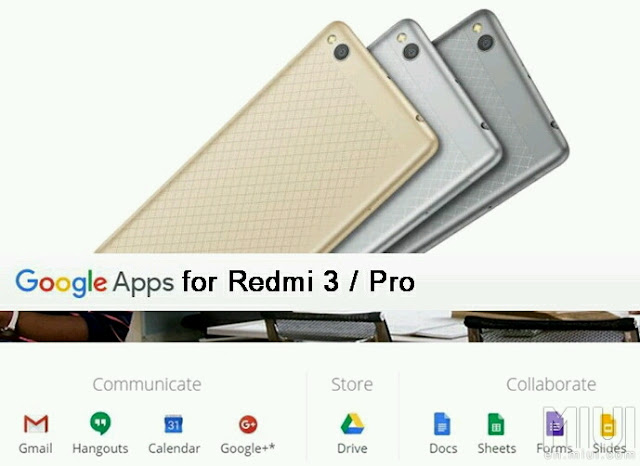
IMPORTANT: Before even going any further, please make sure you enable your settings for installing a 3rd party APK files. Installing APK click the following link: Installing APK file on your Redmi Note 2 for noobies
Features:
Updated V2 of the popular Google Installer by Eric Xiang.
Supports Kitkat, Lollipop & Marshmallow
Easy installation.
FROM YOUR DEVICE:
Just SCAN using your QR scanner to get Google Installer_2.0:

FROM YOUR PC / COMPUTER:
1. Click the flashing Google Installer Icon to download the “Google Installer”.

2. Unzipped and transfer the Google Installer to the internal memory of your Redmi 3 via USB connection.
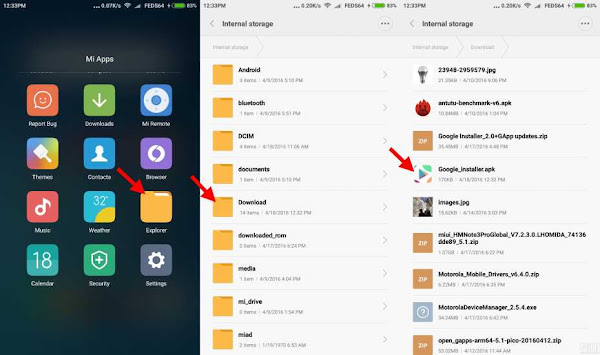
3. Just follow thru’ the sequence like the illustrations below. Goto File Explorer > APKs > "Google Installer.apk”
4. Launch the Google Installer icon. Click Blue Circle to start the installation and follow the sequence as shown below:-
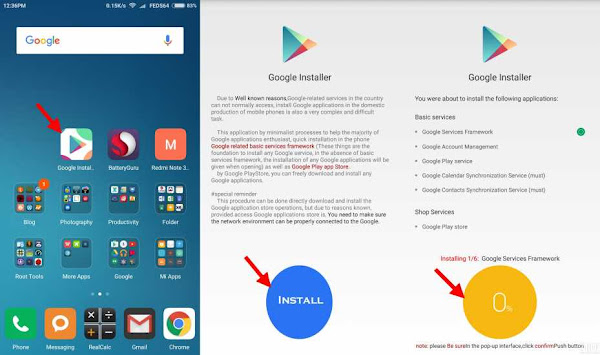
Note: Just click OK and Install, do not click launch at anytime during the installation of the apps.
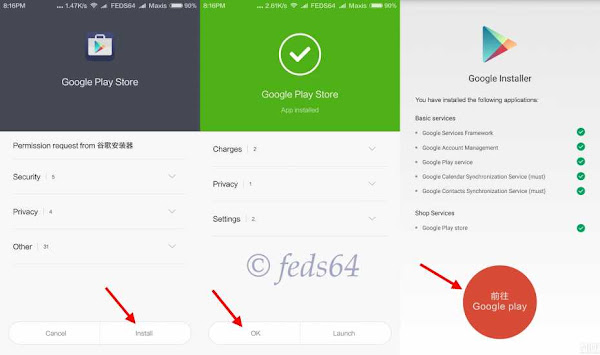
5. Towards the end of the installation, just follow the illustration to click the RED CIRCLE. and accept the terms, click Allow Google to read SMS, finally go thru the setup of Google sign-in, as follows:-
6. As you can see your phone is busy syncing the contact and other Google Apps and wait depending on your WiFi / Data connection for it to update the core applications before even signing to Google Play Store to avoid getting errors.
Note: For those using Development ROM, Goto Downloads > 3 dots on the top right hand corner > Settings > Unlimited, to avoid not download when you are on Data connection.
7. Now you can go with the signing-in to Google and you could now check the Build version. Google > Settings > scroll up towards the bottom, as shown below:-

8. Now, you have successfully installed Google Playstore.
CREDIT:
Eric Xiang - Google Installer_V2
Source
Available link for download
Subscribe to:
Posts (Atom)