Showing posts with label tool. Show all posts

Sunday, March 5, 2017

Flash Unbrick or Upgrade MediaTek MTK Devices With WiseLinkTool MultiPortDownload Tool

Flash Unbrick or Upgrade MediaTek MTK Devices With WiseLinkTool MultiPortDownload Tool


This is another tool which can be used in flashing our MediaTek MTK devices. It works basically like SP Flash Tool but can read scatter files which are either in .txt or .sca format.
Has multi port option which can flash many similar devices at same time.
OK now lets go to how to use WiseLinkTool


Download WiseLinkTool v4.1.0.39 or WiseLinkTool v4.6.4.44
Download and install MTK USB VCOM drivers from here or here orhere
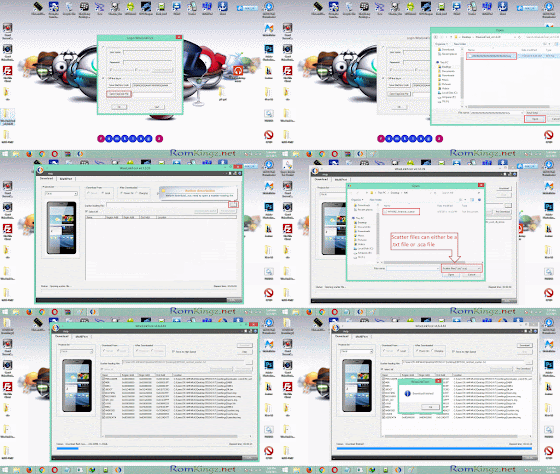
Extract, install and launch by opening WiseLinkTool.exe inside installation folder
Click on Open RegCode File Navigate and select  ZZZZZZZZZZZZZZZZZZZZZZZZ.key from extract folder
Click OK

Now Click on the button with ... to load scatter file (Scatter files can either be in .txt or .sca format)
Navigate and select the scatter file of the device you want to flash/unbrick or upgrade.
Tick the required partition to flash (Tick all for complete flash or upgrade)
Click Download Button and connect phone to PC

When process is complete,the phone will reboot or start charging depending on the option selected After Downloaded Tab.
Note that first boot after flash 
Congrats! you have successfully flashed your device

Common Errors after flashing a device
If you have null or invalid imei number after flash, restore with mtk engineering mode app, chamelephon, SN Write Tool or mtk droid tools
If device bootloops after flash process, do a factory reset from recovery.
If screen of device divides/displays funny colours when boot up, use another ROM or Firmware

.................................................................................................................... 

MultiPortDownload Tool

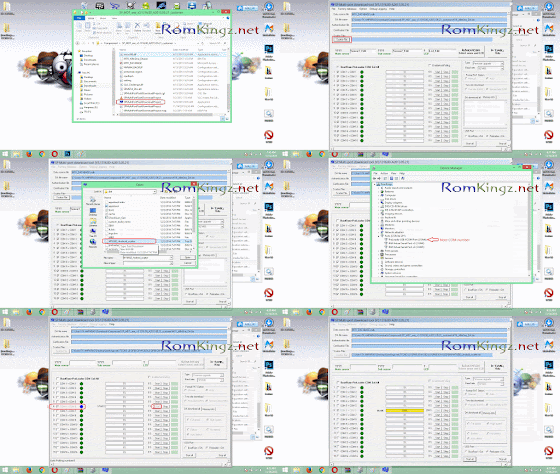
How to flash/unbrick MTK smart phones using MultiPortDownload Tool

Multiport Download Tool (MDT) is just another great alternative tool used for flashing MTK smart phones. Follow the steps below and learn how to use Multiport Download Tool to flash or unbrick MTK devices.

we takes no take responsibility on whatever may happen to your device.
Do at this your own risk


Download MultiportDownloadTool for smart phones from here (Latest version preferable)
Download and install smart phone drivers from here

Extract the MultiportDownloadTool you downloaded
Launch SPMultiPortFlashDownloadProject.exe

If you get a pop up showing Fail (its because the DA file has not been loaded),


Just click OK
To load DA file, click on File and select Open Download Agent Filethen navigate to the folder of MultiportDownloadTool and selectMTK_AllInOne_DA.bin


Click Scatter file button
Navigate to the folder containing the ROM 
Select the scatter file found inside (eg. MT6582_Andriod_scatter)


Under DA Download All Section,
Tick high speed and Auto detect

Open Device Manager by clicking on Help and select Device Manager
Double Click on Ports (COM & LPT)
Connect the device you want to flash
Note the COM Port number
Disconnect the device
On some versions of MultiportDownloadTool , all you need is to click Scan button and connect the device.The COM port will be detected automatically.


Go back to MultiportDownloadTool and tick the COM Port noted
Click Start button on the corresponding port number ticked.
Now connect the device with battery inserted.
Flash process begins when you see a yellow progress bar
The process is complete when you see DL OK and 100% in the progress bar.


Check out the screen shots of the full procedure on how to use sp multi port download tool below


ERRORS!!

If you see a pop up showing FAIL with Cannot find CheckSum.ini file.....  after clicking Start button,


Download CheckSum_Gen.exe from here

Copy it to the folder containing the scatter file
Launch CheckSum_Gen.exe 


Wait for the process to complete and he CheckSum.ini file (process takes about 30seconds)


You can now click Start button to flash your device.
Crdt: #romkingz.net

Available link for download

Read more »

Monday, February 20, 2017

New Latest MediaTek SP Flash Tool v5 1516 MTK Droid Root Tools v2 5 3

New Latest MediaTek SP Flash Tool v5 1516 MTK Droid Root Tools v2 5 3


New Latest MediaTek SP Flash Tool v5.1516

Download new MediaTek SP Flash Tool v5.1516 from HERE, here or here (27 MB). Download previous MediaTek SP Flash Tool v5.1512 from here. You can download SP Flash Tool v3.1332.0.187 from here.

Archive name: SP_Flash_Tool_v5.1516
Archive size: 27 MB


Smart Phone Flash Tool (SP Flash Tool) allows you to flash any stock firmware or any custom ROM on the Android smartphone. Here, we are going to talk a bit about the Smart Phone Flash Tool and its features.


MT657372 Innovative Platform for Mainstream Smartphones
MT6575 Dual-SIM smartphone platform for the mainstream market
MT6577 1 GHz Dual-Core Smartphone Platform
MT6589 Quad-Core Cortex-A7 1GHz+CPU Smartphone Platform


Whats needed:
  • USB data cable
  • MediaTek USB VCOM drivers (doawnload here, here or here)
  • SP Flash Tool 


READ ON: How to Root Tecno L5, M3 Mini Gionee Long Awaited For Die Hard Root Users Enjoy
..........................................................................................................................

MTK Droid Root & Tools v2.5.3


Download MTK Droid Root & Tools v2.5.3 from here, here or here.
You can also download MTK Droid Root & Tools v2.4.6 & v2.5.2 from here.

How to make a scatter file for Mediatek MTK6582, MTK6595, MTK6589, MTK6592, MTK6577, MTK6589T, MTK6572 devices.

What you’ll need
- MTK / MediaTek based smartphone

- USB Data Cable
- USB ADB VCOM drivers
- MTK Droid Tools
 

What to do
Step 1 – Enable USB debugging
Step 2 – Install the PDANet USB ADB VCOM drivers HERE
Step 3 – Download, extract, and run the latest version of MTK Droid Tools.
Step 4 – Your phone should be on at this point. Connect the data USB cable to your phone.


Credit to chinagadgetsreviews

Available link for download

Read more »

Sunday, January 29, 2017

SD Maid Pro – System Cleaning Tool 4 3 2 Apk

SD Maid Pro – System Cleaning Tool 4 3 2 Apk


SD Maid - System Cleaning Tool

This is a powerful tool! Use at own risk!
Nobody is perfect and Android neither.
Apps you have already deleted, sometimes leave data behind.
The system constantly creates logs, crash reports and debug files you don’t really need.
Your SD-card is collecting files and directories you don’t recognize. Lets not go on here…
Why not get a maid to clean it all up?
SD Maid will help you keep your device neat, clean and tidy :-)!
Give it a try, you won’t find a more thorough cleaning tool!
Choose a tab, press start and then either click a single item to delete or press the clean all button. It’s just that easy.
There are various features available:
* Explorer is a full fledged filemanager, use it to crawl through your Androids files.
* You can use the Searcher if you know what file you are looking for.
* The CorpseFinder searches your device for orphaned items and compares those to the list of installed applications.
* AppControl lets you freeze, reset and remove applications (even system apps).
* The SystemCleaner scans your device and filters directories which contain unnecessary files. You an even create your own filters!
* You can optimize and shrink bloated databases to speed up access and free space.
* View your biggest files and find out what is hogging all the space.
* Find files that have been modified in the last X minutes.
And more…
A few additional features as well as comfort and convenience functions can be unlocked by buying and installing the unlocker (SD Maid Pro).
WHAT’S NEW
v4.3.0 – v4.3.2
Huge update, improved core routines, dozens of fixes and reworked tools!
* Zip-file support
* Faster AppControl loading and better filtering (see settings)
* “allocated size” vs “apparent size”
* Toybox instead of busybox (supports both now)
* Merged Searcher and LastModified tool
* “Storage analyzer” tool
* Added & improved SystemCleaner filter
* Bugfixes & performance improvements…
App Info:
App name : SD Maid – System Cleaning Tool
Package Name : eu.thedarken.sdm
Apk Md5 : 88db5820720655dad5c34686038e16c8
Apk Size : 5.34 MB
Update on Play Store : September 10, 2016
Version Name & Code: v4.3.2 (40302)
 Requirements: Android 2.3.3+
  • Download

Available link for download

Read more »